

”What’s a computer?” – Some snot-nosed brat, circa 2017.
I’m sure everybody can already recall the infamous ad campaign without seeing a link.
In case you don’t realize (That’s a rock worth living under!), Apple had an ad campaign back in the day featuring a little girl with a keyboard on her iPad. She ends the ad by uttering the aforementioned quote, as Apple largely wanted to push the idea that the iPad could replace the laptop entirely, something that still isn’t true now, much less before 2020 when the ad first aired.
Back then, it just looked like Apple arriving fashionably late to the whole concept of platform convergence. When Microsoft rushed to the party, we ended up with the disaster that was Windows 8 and a line of tablets that nearly nobody misses.
Instead, Apple sat back, took notes, and decided to build more of an overall consistent ecosystem over several years. The result is something more polished that die-hards of Apple, like my best friend, tend to truly appreciate. Granted, it does lead to a closed-off ecosystem that is harder (or sometimes impossible) to use on other non-Apple devices. The iPad itself is a prime example of this ecosystem and interface consistency in action.
Still, it’s funny to think about now, but I actually own an iPad. Specifically, I am still holding onto the iPad Pro I bought back in 2021, an 11-inch, 3rd gen model, and it’s always been just… fine. Not great, just fine.
Why Did I Buy an iPad in the First Place?

I was migrating back to Android from my brief time on an iPhone, and some small, nagging, little part of me thought, “What if I miss my iOS apps that I already sank time and money into?” That’s when I decided to grab an iPad, this specific model, along with a durable Speck case to protect my investment.
My app-based fear was largely unfounded in the end. Thus, my iPad became a secondary device I had sitting around, capable and well-designed, yet lacking purpose. It’s entire existence felt like a solution in search of a problem.
So for years now, my iPad lacked a compelling or meaningful use. In fact, I can count the very few things we would do with it:
- When cooking or grilling something, we could use the Speck case to stand the iPad up for a recipe to show us the next instructions.
- Every so often a few years ago, I put a bunch of eBooks on the iPad, although I would forget about them sooner or later because I largely prefer physical books.
- When my girlfriend’s phone was low on battery every so often, she could use the iPad to continue casual browsing or watching something.
- From the sofa, we might have used the iPad if it was within reach for a quick online search for something.
Our iPad didn’t really see much other use, but miraculously, it would still stay charged regularly for the most part. That’s also not counting how one of our cats liked the rubberized, black Speck case a little too much, leaving scratches on it. Thankfully, the iPad was undamaged, but I did think of getting rid of it several times.
Before Selling the iPad…
Needless to say, our iPad was little more than a glorified appliance for a few years. I considered selling it, but before I actually did, I asked the great oracle of our time about ways to get more use out of it.
My ChatGPT account knows quite a bit about me as this point, and upon scanning through my history, it had one massive recommendation that I could paraphrase in just three simple words: Get a keyboard.
I mean a hardware keyboard, a real one. Having to bring up the touchscreen keyboard, whether it was the full-sized one or the smaller version that I can move around, always reminds me of how cumbersome and borderline useless it is to do anything useful with a purely touch-centric device.
Even a simple search would be annoying enough to the point that I would occasionally dig out my openSUSE ThinkPad or my M1 MacBook Air to perform a real search, much less using ssh to get into my Mac mini server from an iPad.
While I would open Obsidian for recipes, I also found little reason to type anything substantial into it from the iPad without physical keys. I even have Scrivener on iPad, the major app I bought for the device, and it was largely useless as I would find it too annoying to tap glass just to add a few lines to a novel draft or do any real editing. At best, I could look through everything I wrote in a draft, but that was it.
Longtime readers are no doubt unsurprised by this, as I did go as far as trying to attach a keyboard case onto my Pixel 9 to make my phone feel more useful for a little over a year (I since stopped using it a month ago for a few reasons I can discuss another time), so it goes without saying: I need hardware keys to feel productive; software keyboards are useless to me.
The Hardware Keyboard Upgrade
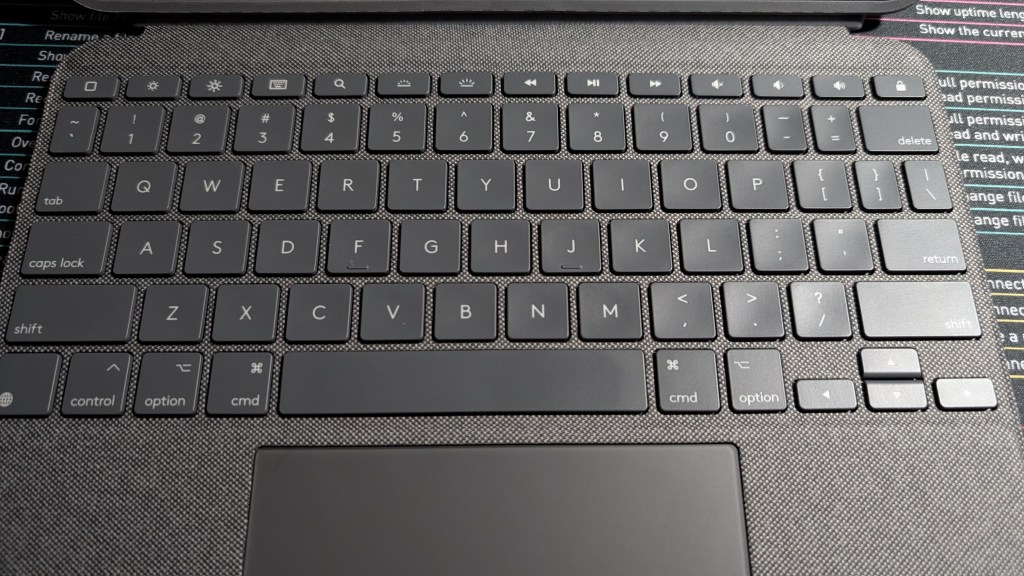
I initially thought this upgrade wouldn’t make the biggest deal, maybe make the iPad slightly nicer to use.
Still, after seeing a deal pop up a few weeks later on the Logitech Refurbished website (Seriously, I saved a lot!), I snagged the Logitech Combo Touch compatible with my 3rd gen iPad for just a little over $100. A few days later, my order arrived, and I slipped the iPad out of the Speck case one final time to attach my keyboard case.
A few days later, I’m typing this from the iPad now! I never thought once in the years I owned the iPad that I would actually find this device remotely useful, but here we are, and it’s all thanks to this! Since getting the iPad, I’ve been reaching for it far more often now:
- I can actually open Obsidian and not just view it. In fact, I can type in it without becoming fed up after a couple of sentences.
- I can SSH into my server and do just about anything I would normally do from Blink.
- I can easily open up ChatGPT and get quicker answers with a comparable experience to using the service from my M1 MacBook Air.
- Scrivener on my iPad is actually usable now. Enough said.
- I can now more easily setup server-related utilities to interface with my server in general, such as an app for streaming video from Jellyfin, an app from streaming its music, and another app for streaming my audiobook collection.
I Didn’t Stop There
It’s been about another week since I got the iPad its keyboard, and I’m still largely happy with how it operates. My girlfriend still likes using the iPad too, but she doesn’t see it as a borderline useless substitute for her phone anymore.
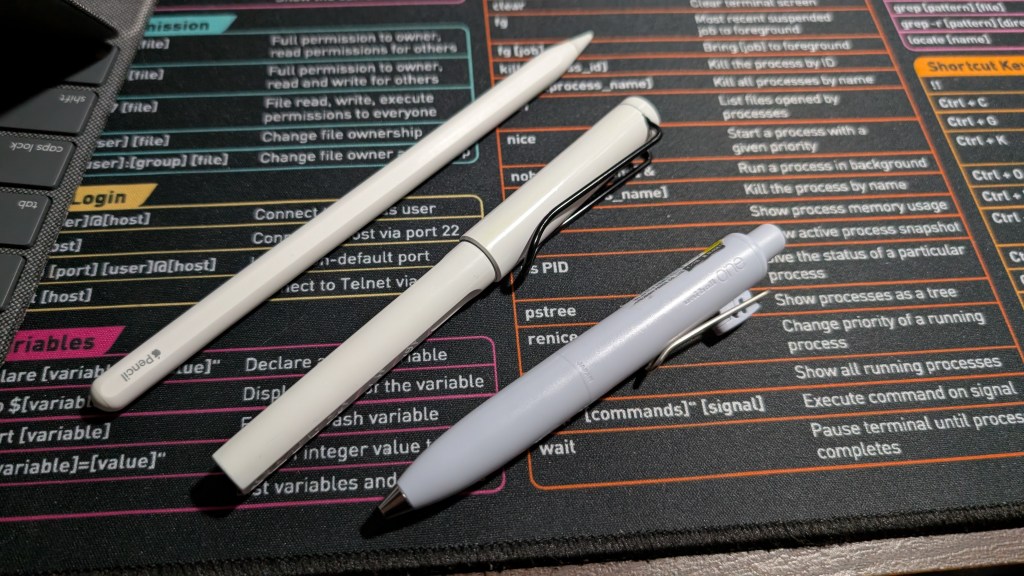
That said, we decided we hadn’t gotten enough usefulness out of the iPad Pro itself, which is why we shopped around (Again, I found another wonderful deal!) and picked up a refurbished Apple Pencil 2nd gen. Pairing it with the iPad was outrageously simple; I just snapped the Apple Pencil physically into place on the one free edge of the device.
After picking up a paper-like screen protector, this iPad Pro went from a useless toy to something we both genuinely want to pick up and use.
The iPad largely still sits in our living room, although with the Apple Pencil, we are doing different things with it.
- I use the iPad each morning with the Apple Pencil to practice writing with my non-dominant hand, an endeavor I may cover in a future post.
- My girlfriend and I both like using a few art-related apps, including one that’s teaching me to digitally draw.
- I actually use Apple Notes sometimes now! While Obsidian is still largely the best note-taking option for me, I do like doodling things very quickly in Apple Notes thanks to its excellent (and expectedly so) integration of the Apple Pencil.
I have toyed with the idea of digital bullet journaling with this device, but I’ve since migrated back to an analog bullet journal as of late (despite dropping it for a while), albeit with a lot less frequency than before.
This Raises Questions
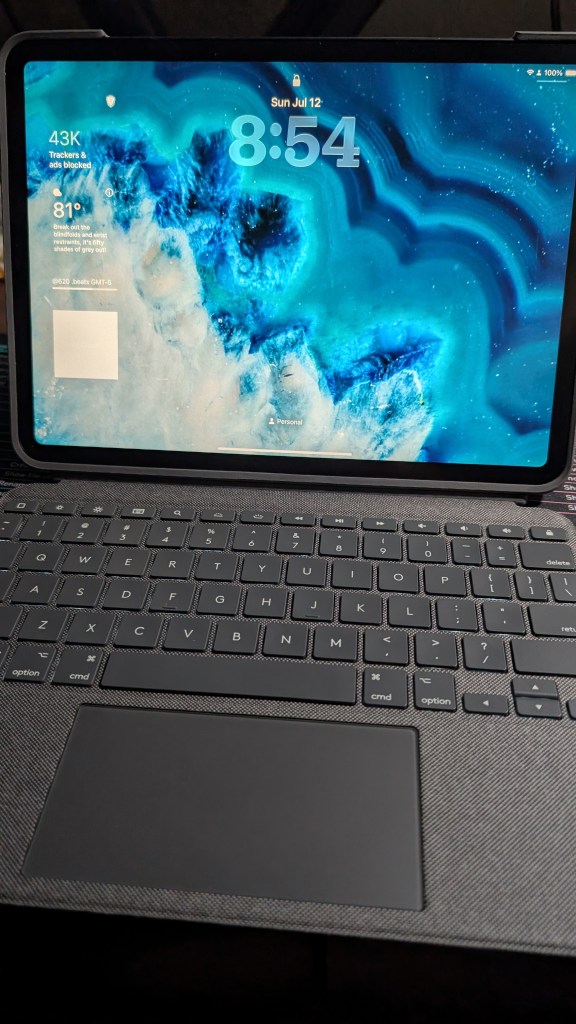
After using the iPad with these accessory upgrades, it went from a superfluous gadget to a genuinely useful tool that more than pulls its own weight. I even reach for it more often as of late for quick browsing or specialized tasks on the sofa compared to the M1 MacBook Air I normally use for work, and that device is still extremely capable to begin with.
Still, I didn’t write this simply to promote impulse purchasing or compulsive consumerism. If anything, my purchases were deliberate and well-thought out, especially considering I was looking for the best possible discounts I could get on both accessories refurbished and saving $185.11 overall compared to full prices new on both items. (Yes, I sat down and calculated this.)
However, one thought still comes to mind: Why does it take buying a few major accessories to make the iPad itself ten times more desirable and useful?
In other words, why would Apple sell such an incomplete device that needs more added to its price tag to make it usable?
I don’t really have an excellent answer here outside of the fact that one’s use case might make or break when it comes to a tablet in general. I remember when the first iPads launched circa 2010, how Android tablets were being rushed to market, how Microsoft bet wrong on Windows 8 and 8.1. It seemed like tablets were going to be our inevitable future, that the days of desktops were allegedly numbered. But now? Tablets are generally seen as a strange “middle ground” when it comes to general computing, and I don’t simply say that just because I’ll take my desktop over a tablet just about any day.
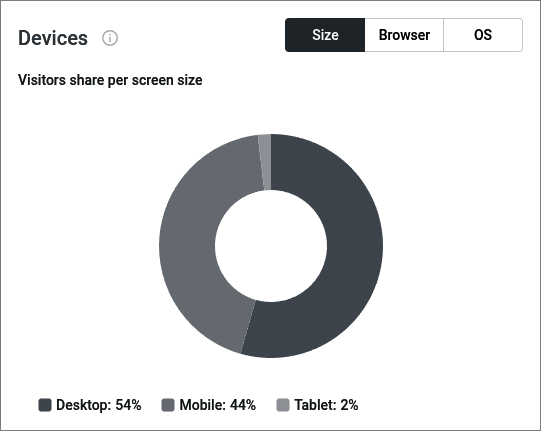
According to just my stats, tablet traffic is in a (very) distant third place, lagging very far behind desktop and phone visits. Sure, one could tell me that this is just my site, that other websites may differ, but let’s be honest: Tablets fulfill specific niches depending on who is using them.
Someone like me may find a tablet utterly unusable without a physical keyboard. A dedicated digital artist may find an iPad intriguing, but having no stylus could be the deal-breaker that makes the artist consider a Wacom instead. A compulsive doomscroller or a small child may not care about those accessories at all because simple taps and swipes are all they need.
But as I think here, something else occurs to me: I didn’t fundamentally change the software of the iPad itself. Rather, I simply changed my overall input methods. Say what you will about me using an M1 MacBook Air for work, but being able to trick it out to somewhat resemble a Linux desktop makes the experience that much more enjoyable as a whole. That said, there’s no way I’m getting an experience even close to that on an iPad.
Using the Logitech keyboard allows for much more practical use of the iPad for me, and the Apple Pencil allows me to discover and learn digital art while working on a new skill at the same time. Both are better than the alternative of fumbling around with just my fingertips alone on a glass screen.
To Tablet or Not?

Aside from all of this, can the iPad seriously replace any of my other devices, my laptops or my desktop?
In short: No.
The iPad, while much more useful, is still not as capable as a dedicated desktop or laptop, and that largely boils down to the software, the operating system itself. If iPadOS were a little more open in the same way as macOS, it would certainly be a far more interesting proposition. For now, however, I can still say that girl from the 2017 commercial was just as annoying as she was wrong. If anything, my iPad carved out its own unique niche that my main computers doesn’t really scratch.
Do you regularly use a tablet yourself? Or do you prefer your phone or desktop operating systems as a whole? Do you find that a tablet largely needs other input methods to be more useful for you? Or do you prefer to use a barebones tablet with just touch features? Do you have any other thoughts or ideas about iPads or other tablets in general that you would like to share or voice? Did I accidentally a typo? As always, feel free to comment below.
*Side Note: In case anyone was wondering: Yes, the featured image is intentionally ridiculous. I couldn’t resist, and I have no plans to change it in the future at this time.


3 responses to “Making an iPad Useful with a Keyboard”
[…] didn’t install it on the iPad my girlfriend and I share, as that device occupies a totally different niche in our home. Furthermore, I didn’t bother to install it on my neglected and increasingly useless Windows […]
LikeLike
[…] not to say that tablets aren’t capable; attaching a keyboard case and Apple Pencil to an iPad can make turn a passive consumption device into a capable productivity tool. A lot of people prefer […]
LikeLike
[…] something, but I really do like Scrivener. I bought licenses for it on my Macs, my Windows systems, and even my iPad. I have over 12 years of writing history with it, and I don’t plan to stop using it anytime […]
LikeLike