

I’ve been trying to deal with a few more matters related to my productivity as of late, especially considering I’ve had a rather eventful July and August. So many things have been happening, and I’ve needed to find better ways to stay productive. I used to time block on paper a lot more often, but I found myself looking for other ways to do this eventually, as I was using more paper for one-time sessions of time blocking than I expected. After coming back from my two week vacation earlier this year, I didn’t bother to pick this habit back up again either.
I did watch Ryder Carroll’s videos again on the official Bullet Journal channel recently in my search for extra productivity and means of getting things done. I really took a liking to his series on comparing notebooks against productivity tech. As of the time I write these words, he only has three videos in this series comparing the bullet journal to digital calendars, task managers, and habit tracker apps.
I had an epiphany when watching this video in particular, as I did have a digital calendar I hadn’t used in a few years. In short, Carroll endorsed the way to make a digital calendar and bullet journal complement one another:
- Schedule future events and time block with the digital calendar.
- Then reflect on what has already transpired within the bullet journal monthly spread.
Carroll really delves into the idea of reflection and doing things with intentionality, but that’s beyond the scope of this writing. Nevertheless, after logging back into Nextcloud and going back through the calendar, I was determined to make good use of it all over again.
Even if I had never seen Carroll’s video on digital calendars, I did recently start a new job. It’s akin to my previous position, but as expected, some things are the same and many are very different. I was tasked to manage the workplace calendar, and I think there are better ways to do that outside of relying on Google Calendar’s online UI.
Dusting Off My Digital Calendar
Of course, as anybody who’s used Nextcloud’s online UI knows, it can be rough. While it’s not anywhere near as bad as using the RSS reader without an app, it’s still not ideal, so synchronizing to a separate, dedicated calendar app on the desktop is a must.
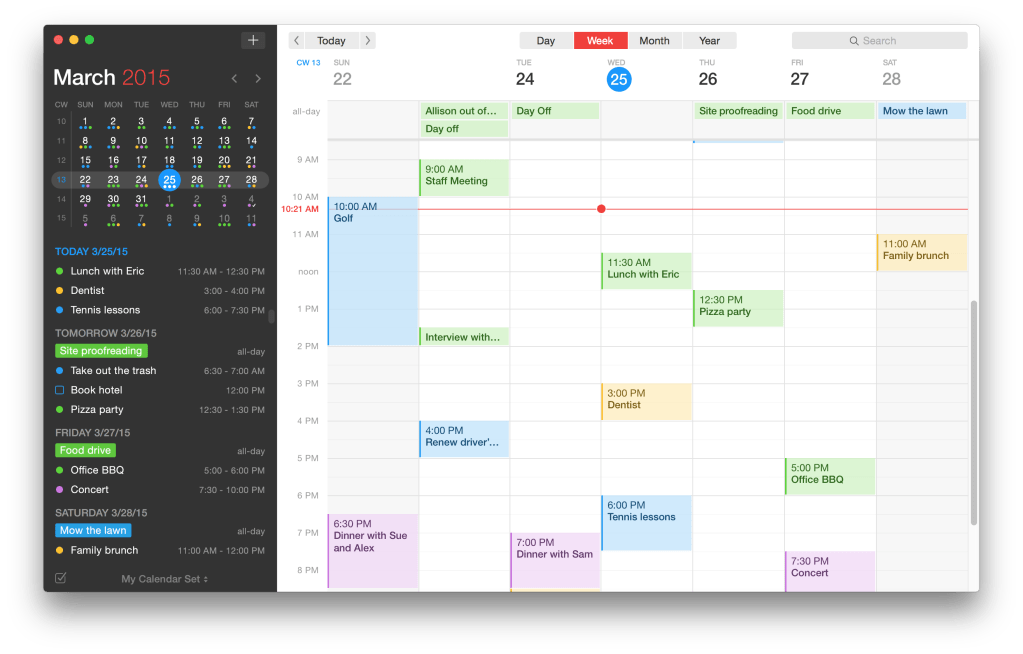
A few years back, when I last seriously used this calendar, I was using Fantastical. To be frank, I loved this app! It has a slick interface, it lets you easily add appointments and scheduled events from the system tray, and you can use natural language to add appointments. Synchronization was immaculate, too. Going further back enough, a much younger Mr. Hyde also used the app with Google Calendar over a decade ago when he attended college. I never had issues from a usability standpoint when it came to Fantastical, and I still hold this position today.
Of course, the keyword is “usability.” While I did like using Fantastical with Nextcloud more recently, I ran into a few serious limitations with it.
- Fantastical is a proprietary app with a premium pricing model that I didn’t really like. When I switched to Nextcloud and later to Linux, it made even less sense to pay as time went on.
- It’s an Apple ecosystem app. Yep. Some part of me utterly loathes how such elegant apps are made only to be overpriced and limited to release on macOS, iOS, iPad, etc.
- Last I checked, there are no free upgrades to Fantastical. The first time I used an edition of Fantastical over a decade ago, I recalled being quite happy with it, but I wasn’t so happy when I had to pay to upgrade to a “new” version 5 months later.
- While it was really cool at first, I found myself becoming less impressed with the “natural language” feature of adding dates and appointments. While it was convenient, it was only somewhat more convenient than manually clicking days and setting reminders.
While there is a free subscription edition I still use on my iPad a little bit (I don’t remember if I had to pay upfront to use Fantastical on the iPad in the first place, but I wouldn’t be surprised), my iPad is a mostly underutilized device to begin with. I usually have the iPad near the sofa if my openSUSE laptop or Android phone aren’t within reach, and my girlfriend finds herself making searches on Brave with the tablet most of the time. The widget is still on my home screen and it mostly sits there with my Nextcloud calendar still synced to it after all this time.
Still, there’s the obvious fact that I can’t run Fantastical on Linux. To sync with my Nextcloud calendar, to really take advantage of my time-blocking mindset, I would need a better desktop app to suit my needs.
Premature Celebration!
I thought I stumbled across the perfect solution when I set up GNOME Calendar. It’s free, it’s open source, and it syncs with my Nextcloud server easily. Unfortunately, after a few minutes of trying to schedule events and time block, the cracks in GNOME Calendar quickly showed.
- I can’t drag and drop events or time-blocked tasks around. At all. If I want to reschedule anything or push something further along, I need to edit the event manually.
- Occasionally, the app, upon launch, will show some of my events twice. Closing and relaunching it will fix this redundancy until the next boot.
- I can’t access the settings and accounts from outside of a GNOME session. Really annoying when Hyprland is my primary compositor right now.
- The options to have events repeat are rather limited and rigid.
- Worst of all: the app is extremely annoying when it comes to trying to add events.
I’m willing to elaborate on the last two from the list in particular. With repeating events, you can only pick the obvious choices like monthly, weekly, yearly, and so on. If you want something a little more specific, like if you have an event each Wednesday and Thursday every three weeks only, it’s not feasible in the slightest to fine-tune these preferences from the GNOME calendar app.
Additionally, I’ve struggled with adding events to GNOME Calendar. I hope you enjoy only adding events that are exactly 30 minutes only, because if you want to change the length of the event, GNOME Calendar tends to edit the start or end time on its own to try and fit the 30 minute default. If I want to add a 3-hour event that goes from 1 PM to 4 PM, I’ll click on 1 PM on the weekly layout to add the event.
No problem so far, but then the issue returns when I try to change the end time to 4:00 PM. I’ll add the event and realize something doesn’t look right. After a few moments, I’ll notice GNOME Calendar automatically set the start time of the event to 3:30 PM just moments before I added the event because it really thinks my events should all default to 30 minutes in length. Why does GNOME Calendar insist on doing this?
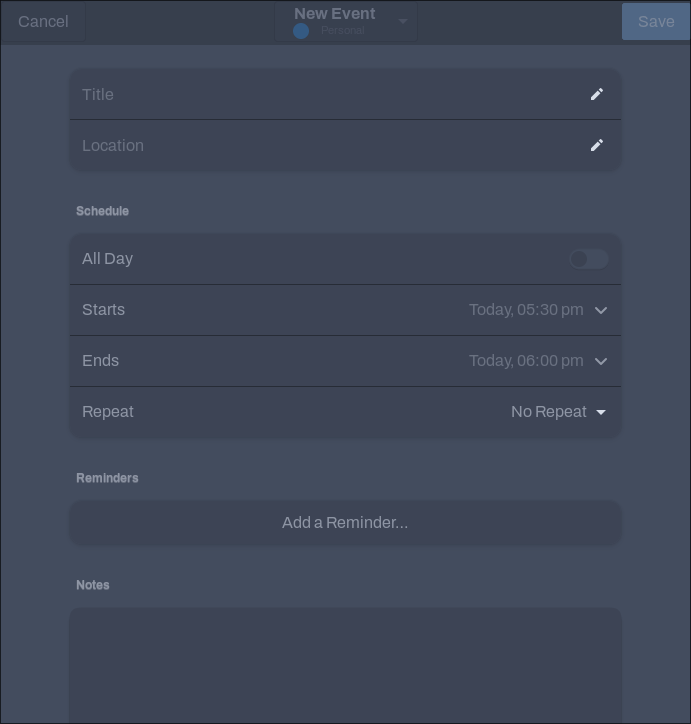
This little quirk of GNOME Calendar was a frustrating time-waster to say the least, which is why I started searching for a replacement almost instantly.
Other Apps I Considered
I was tempted to look into the well-known Evolution, although that’s not really a standalone calendar app, but a consolidated app that primarily uses email. I’m already using either Betterbird or Mailspring depending on when I publish this, so why would I want to go through the setup process of entering in all of my email addresses (many of which are 2FA accounts with app passwords or a security key) only to realize that I don’t really care for how Evolution does things with its UI?
Besides, Betterbird has this calendar feature baked in as well, though I will admit I never liked the Thunderbird’s calendar in the first place. Just glancing at the calendar UI in Betterbird moments ago, the very same one I would see in Thunderbird, put me off right away. It’s mostly an aesthetic thing, which is at least one thing I can give GNOME Calendar over Thunderbird.
After extra searching, I started to realize I wanted a calendar app that met specific needs for me. I want a calendar app that:
- Is aesthetically pleasing to use; if a calendar app is ugly, I’m a lot less likely to open it.
- Allows for features I find useful such as dragging appointments around.
- Is easy to use without annoying quirks such as defaulting appointments to be 30 minutes or an hour by default.
- Is flexible enough for my needs, allowing me to set specific reminders or recurring dates that are unusual.
- Comes for free or at a low, inexpensive price.
- Supports sync with my Nextcloud calendar along with several other accounts such as a corporate Google account.
- Is usable from a Linux device.
I looked around for a while for something that supported my needs, and I eventually found a possible candidate to install.
Introducing Morgen
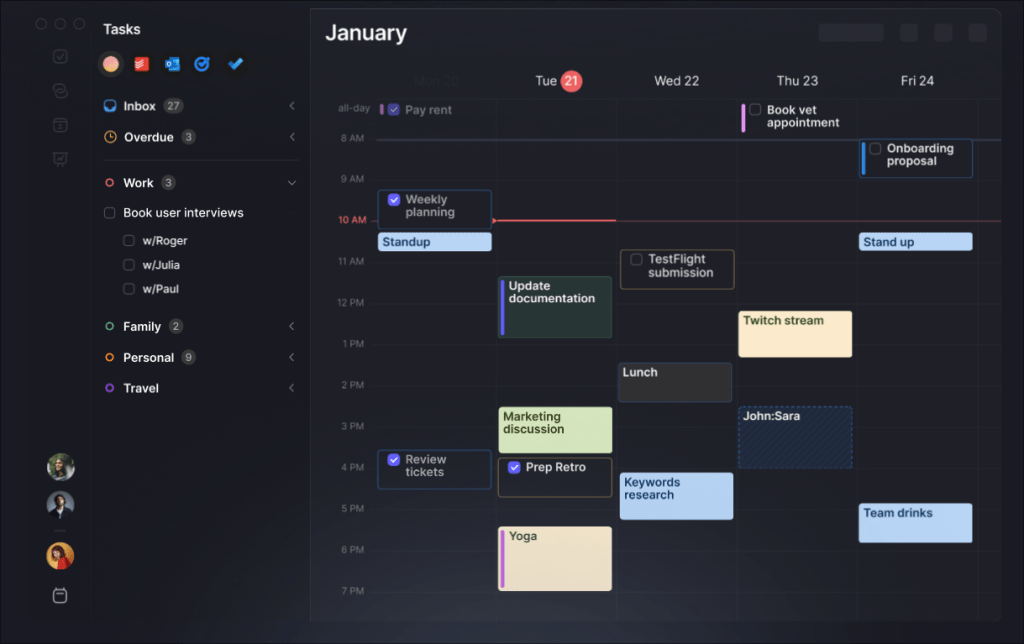
I discovered the calendar app Morgen suited several of my needs and then some. Granted, I’m not really willing to use many of the features it comes with (more on that in a bit), but it does check off everything I want it to do.
- Morgen looks good enough for my needs despite only having a “light/dark” toggle with a rather modern and flat UI.
- Easily allows for features like dragging appointments around, setting specific reminders and recurring dates, not defaulting to rigid blocks of 30 minutes, and more.
- Uses a freemium model with a low-cost subscription.
- Definitely syncs with any calendar I’ve thrown at it.
- Best of all, it works on Linux!
As for how I’ve gotten my hands on Morgen for Linux, it supports multiple means of installation including Snap, Flatpak, Appimage, deb, and rpm. Installing was a no-brainer on both my Arch and openSUSE systems, and setting up sync was easy.
Additionally, getting my Nextcloud running was so much easier than I anticipated. All I had to do was create an app password, enter in my server address and login, and I was able to sync everything just like that. I was honestly shocked at how dead simple it was, especially after how I had occasional issues syncing my Nextcloud’s RSS to a dedicated reader. As expected, adding my workplace Google Calendar and keeping things separated and easy-to-use was a cinch.
Adding appointments to a relevant calendar is a snap, too. I can click somewhere on the calendar (I prefer to click on a day and time slot on the weekly view), enter in some details, and there’s my event! But my praise goes a bit beyond that; I love how the weekly view, my default, expands the width of today’s day to make finding what day it is easier.
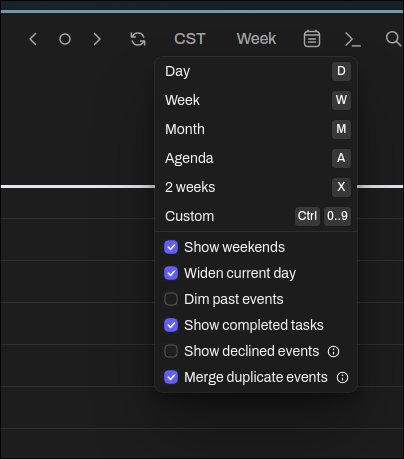
Another feature I’m a fan of includes the custom view for your calendar. You get the usual view of day, week, month, agenda, and so on, but custom allows you to press the Ctrl key and a number to show you a layout consisting of today plus the following amount of days. As an example, hitting Ctrl + 2 shows you today and tomorrow only, and Ctrl + 3 would display today, tomorrow, and overmorrow. This feature is especially useful if you know you have a couple of busy, stressful days coming up, so you’ll be able to zoom and focus in on those few days to plan. This was a godsend for me on my openSUSE laptop during my move last month.
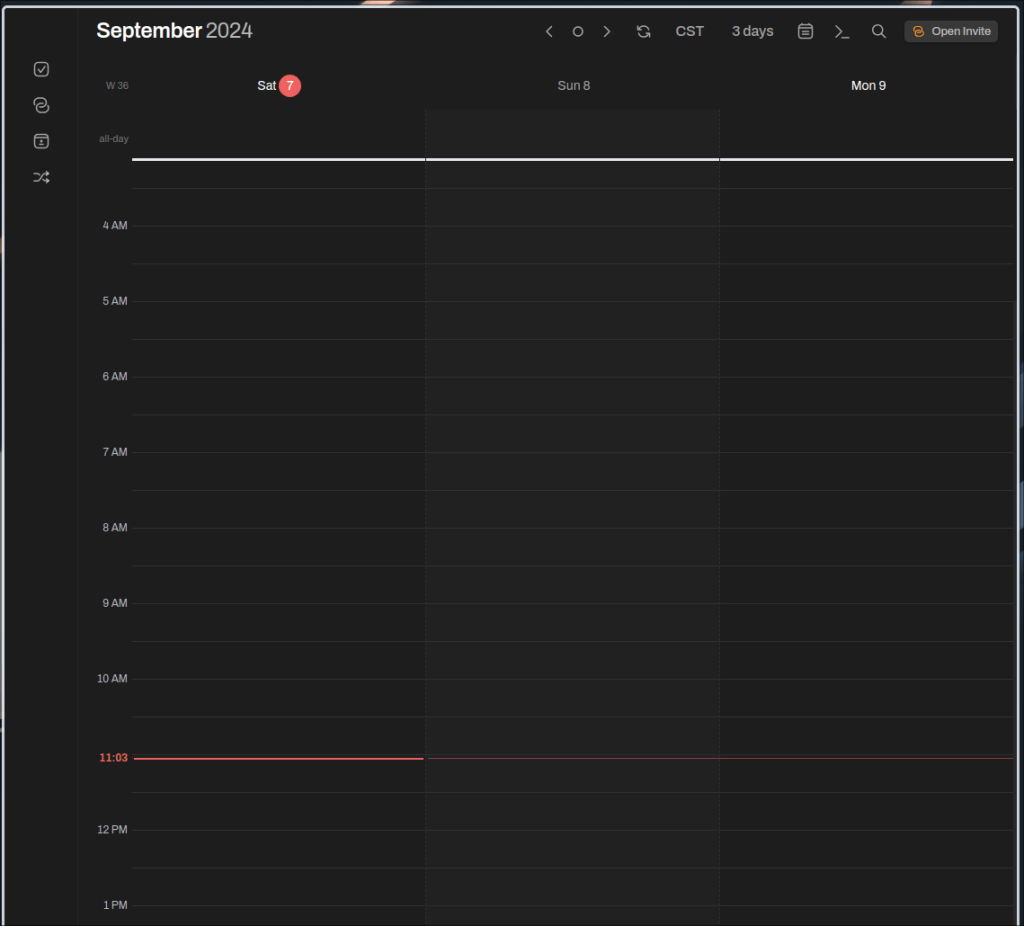
Other than that, everything was easy to use and pretty simple. With Morgen, I easily drag and drop appointments around to other days, I create time blocks and move them easily, and I found the UI pretty solid.
What I Don’t Like About Morgen
While I am a fan of Morgen, it’s not perfect. In fact, I would say it’s biggest weakness, at least for me, is how many additional bells and whistles it comes with.
Morgen doesn’t want to only be a calendar app; it also wants to handle your task integration. That’s why it integrates with so many services like Notion, Obsidian, Google Tasks, Todoist, and many more.
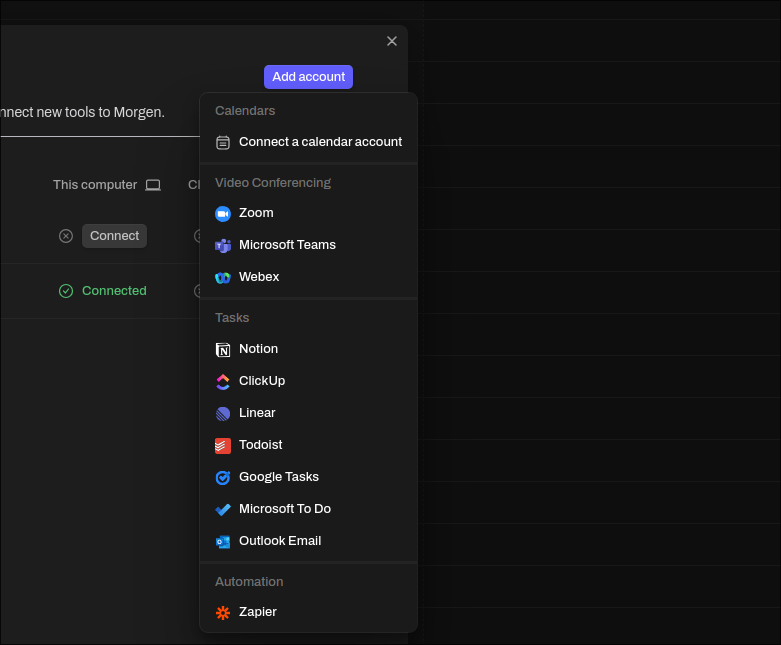
I can’t help find it a bit much because I can’t see myself ever using so many integrations, even back when I used Todoist for a brief stint before starting this site. In fact, as an Obsidian user, I still can’t see myself using so much as that integration feature either. It’s partly why I didn’t want to use Evolution for my email, because it has some extra features I don’t really see myself using. It may just be me, but I like having an app or program that does just enough for me while doing it exceptionally well.
Speaking of extra features, Morgen supports adding people to calendars, sharing calendars with others, and all sort of other similar bells and whistles I can’t imagine subjecting my less tech-literate colleagues to. Subsequently, I don’t see myself using these features at all, so paying extra for them makes little to no sense for me.
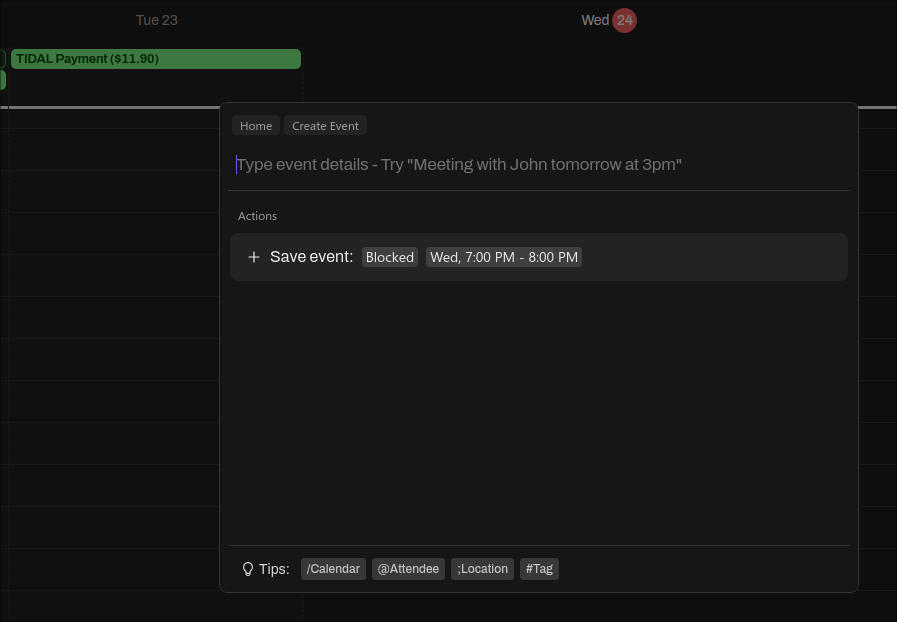
Not to mention there is some AI integrated in Morgen because of course there is, it’s current year, so why wouldn’t there be AI? Despite how recent research has shown many consumers are turned off by AI as a selling point in a product, this is one of the apps that still boasts it. Morgen claims to have AI planning features and a “natural language” prompt that lets you type out appointments with details in plain English much akin to Fantastical. For example, if you need to meet your friends tomorrow, you could theoretically use the prompt feature to type “Hang out with Julian, Ricky, and Bubbles tomorrow from 7 to 9 PM,” and the app will start creating an appointment with those specific details instead of you having to manually enter in the event name, the start time, end time, and actual date.
I was originally going to say that Fantastical did this better, but after playing around with it, Morgen does this better than I expected. Still, as I did with Fantastical, I still find it easier in general to add events and appointments through other means, like clicking on the calendar to enter the details. Considering how far UI has come in terms of usability, this isn’t such a tedious prospect anymore.
There’s also the price of Morgen. While I get some services like Morgen requiring a subscription price, I’m not the biggest fan of paying $15 a month for the privilege of adding more than a few calendars and accounts. In fact, this is the primary reason I’ve coughed up any money for Morgen, although I think it would be much more palatable if I had to pay only $5 a month. Ideally, I wouldn’t want to pay a fee at all, but considering Morgen is the only calendar app on Linux that has met all of my needs thus far, I begrudgingly pay the subscription at this time.
The Search Goes On
While Morgen is meeting most of my needs as a whole, the subscription price and unnecessary features (at least for my use case) still make me feel as though I could do better if another app came along. I’m still open to finding a different app at some point, especially if it lets me do the same things Morgen does while saving me money. It’s part of the reason I switched my password manager to a self-hosted Bitwarden instance just before moving across the country instead of paying for something exorbitant that does the same like Dashlane, RoboForm, or 1Password. It’s also part of why I switched from Matter to Omnivore to save my hard-earned dollars.
Do you use a digital calendar? If so, which one? Does it meet your needs at an affordable price, or are you still searching for something better? Feel free to discuss or comment, especially if I managed to miss something good that works on Linux. I’d love to know what you have to say on this.


7 responses to “Searching for a Perfect Linux Calendar App”
I’ve been on the same quest a couple of months ago, and similarly ended up with Morgen. I have the same issues with it you have, though. Not to mention the program seems to use up quite a bit of system resources. Honestly, I often end up using Business Calendar Pro on my Android devices to manage my calendar instead of a desktop app, as it’s just that much more powerful.
In fact, I’ve been looking into emulating Android on my desktop just to open an instance of BCP on it, but it seems Android emulation isn’t quite on that level yet. So, like you, I’m still on Morgen until something better comes along. (I’m not paying them anything, though. Luckily, my use case falls within their unpaid offering.)
LikeLike
This is a fantastic post, and I learned a lot about Morgen! A lot of the points you raised resonate with me, especially the question of aesthetics. For some reason, I also need an exceptionally good-looking calendar app to deal with something I otherwise put off, and the same is true for emails (thank goodness for Thunderbird).
As I run the KDE spin of Fedora I have tried my luck with Merkuro Calendar. It has come a long way this past year, and I find it more polished and simple than KOrganizer. Unfortunately, I have been having some issues lately where the calendar disappears, yet I still get desktop notifications. Still, it has proven to be a really good experience overall. Since you seem to be running Hyprland, you can get it as part of the Kontakt flatpak on flathub, perhaps it’s worth a shot 🙂
LikeLike
[…] myself curious enough to try BlueMail, especially considering it has a built-in calendar app (and I’ve been looking for a better Linux calendar app for a while now). Upscayl finally works again without a segfault, […]
LikeLike
[…] incorporating these into my existing time block setup with whatever I’m using as a calendar, I’ve felt myself making more progress on my […]
LikeLike
BORG Calendar I heard was good but so far I failed to run the purely java app on my linux arch.
LikeLike
[…] can run so many more apps more on-par with what I used on Mavericks back in the day. That includes the first version of Fantastical, Flavours (yes, the app is spelled with a “u”), Alfred, Bartender, Textual, and my copy […]
LikeLike
[…] UI is extremely refined. My Nextcloud Calendar UI, on the other hand, was a usability nightmare. It was part of why I tried to hunt down a good Linux calendar app for quite some time. Despite that, I had some issues trying to subscribe to special interest calendars like Google […]
LikeLike