

There have been recent developments with myself being hired by a new employer, which has left me without a job for just a couple of weeks. During that time as I got my paperwork, background check, verification, and so on finished before hire, I found myself with an abundance of extra time. Even with the extra time to dedicate to the 5 AM Club, I still had plenty of time on my hands as I waited to start my new job.
Consequently, I found myself playing some PC games again for the first time in an extraordinarily long time. Despite how I try to do the majority of my PC gaming from my Arch Linux partition, I still have a Windows drive dedicated to the handful of games I run that don’t play so nicely with Linux for one reason or another. Yes, I’m aware of how I went on a tirade about the state of modern Windows just a short while back, but I really don’t use this Windows partition for anything else. It has very basic things installed for a barebones experience. As a result, my desktop has few icons and looks just like this:

Your eyes do not deceive you; this is my Windows 11 partition. You might be forgiven at first glance for thinking I’m running XP, although there are a few giveaways hinting I’m running a more modern Windows, such as the systray icons not quite looking XP-ish enough, or how programs that are not XP-compatible are present on the desktop. In case anyone is curious, I simply upscaled the classic Crystal wallpaper (I’ve always liked it more than Bliss) included with Windows XP for a 1440p display while running RetroBar automatically on startup. While I have praised Windows 11 for at least looking nicer than Windows 10, I still find myself remembering, reminiscing fondly over my time using XP back in the day, including when I ran it as my daily driver for the first time 20 year ago.
However, I’m not that young that XP was my first ever Windows; that “honor” would go to Windows 95 on an old Compaq my family had when I was a child in the 90s. We eventually upgraded to a Windows 98 machine a couple of years later. I specifically recalled myself, a far younger Mr. Hyde, being so pumped to learn that our then-new Windows 98 computer would include a CD-ROM drive.
However, I didn’t like my time using Windows 98. While it did let me explore more parts of the web and the like, it was stuck with a dial-up connection, and the system would oftentimes just crash or run poorly. I’m not sure how much of it was because of the “crapware” included by the OEM when we first got it, but I found myself so frustrated when trying to get things done with the 98 machine. When my family had made the leap to XP, we got our first broadband connection as well (dial-up is another reason I don’t miss the way everything was), the system felt snappier and more reliable, and everything was so much more pleasant to use afterward. It was satisfying to see the old 98 computer ousted from its spot in the family computer room in favor of a shiny, sleek XP system. (On a side note, anybody else old enough to remember when we had family computers and computer rooms?)
XP was still the latest and greatest at the time I started running it, and I really had so much fun as a teenager making the OS my own. I could run AIM to chat with friends from school, download MP3s of all my favorite music from Kazaa (I was a little late for Napster) and later Frostwire (it started as a fork of Limewire before becoming a bittorrent client), customize my system with control only modern Windows could dream of, and run the same handful of CD-ROM games I had on Windows 98, but smoother and better than ever before with a Microsoft Sidewinder USB gamepad. Despite the many versions of Windows that came and went afterward, none have really felt as groundbreaking and beautiful to me as the leap to XP.

In short, I can still say with complete confidence over two decades later that Windows XP was and still is my favorite Windows version of all time.
What About Windows 7?
Honestly, I liked Windows 7 enough, I really did. I know so many people see Windows 7 as near and dear to their hearts for so many different reasons, and I even found myself “upgrading” to it from Windows 8.1 after suffering some of the usual Winrot.
Still, to me, Windows 7 felt more like a continuation of what XP had first sown earlier that same decade. XP laid the groundwork for Windows 7 to later thrive after Vista died, and there is one thing both versions of Windows do have in common: Most of the world refused to upgrade from them for years. When Vista came along, many people refused to upgrade and held on to their XP installations. When Windows 8 launched, many people refused to upgrade from Windows 7. Even now, a good while after Windows 11 has launched, many people are actively going back to using Windows 10 as of this year. I don’t blame anyone for that, as later ARM-based Windows 11 releases promised to start spying on us with Recall, although thankfully, Microsoft has acknowledged the backlash by making this AI- powered form of surveillance opt-in.
Regardless, I still hold XP in higher regard for its time than I did with 7, as excellent as Windows 7 was in its time as well.
Why is Windows XP My Favorite Windows of All Time?
I have several different reasons for holding XP in higher regard than Windows 7, and it’s not just because of the nostalgic value I placed on it. Sure, I can admit that looking back on it fondly does affect that somewhat, but it’s not the sole, deciding factor. I can break down just why XP holds such a place in my heart.
Reason 1: The UI and Customization
Windows XP launched in a time period when we actually had choices on how to customize our UIs on Windows or Mac machines. Nowadays, if you use either macOS or Windows 11, it boils down to three options:
- Light mode or dark mode
- Accent color from a selection of swatches
- Wallpaper
If you’re lucky, you can enter a hex color for the accent, but otherwise, that’s it. While I may admit that not everybody wanted to customize more than these three things, I still don’t understand why we had to regress entirely and otherwise throw so many options away.
Out of the box, Windows XP let you choose three delightfully skeuomorphic “Luna” themes: blue, olive, and silver. The default blue was always my go-to when I first ran XP, but you really couldn’t go wrong with olive or silver. In case you really hated these new themes for looking too “Fisher-Price,” as critics in the day were apt to point out, you always had the option of “Windows Classic,” which looked akin to Windows 2000 and earlier with the traditional grey panels.
Eventually, we got two Royale themes from Microsoft: Royale Blue (which came with my XP machine, as it ran Media Center Edition) and Royale Noir. Both themes looked so sleek and shiny by taking what worked before and improving upon them. Microsoft even tweaked Royale Noir to create a Zune-based theme in order to promote their MP3 players at the time. I’m aware there are other styles like Embedded Blue, which I never got the chance to use back in the day, and the other placeholder themes like Watercolor.
Still, if you were unsatisfied with the themes provided by Microsoft, you always had the option to install new themes and visual styles. All you needed to do was patch your uxtheme.dll file and download new XP-compatible themes from the likes of DeviantArt or elsewhere. So many theme creators went for the obvious and created themes that looked like OS X, Windows Longhorn, Windows Vista, Windows 7, and much more.

In fact, just a quick search on DeviantArt for “windows xp visual style” brings me to so many stunning themes from decades back, such as the one pictured above.
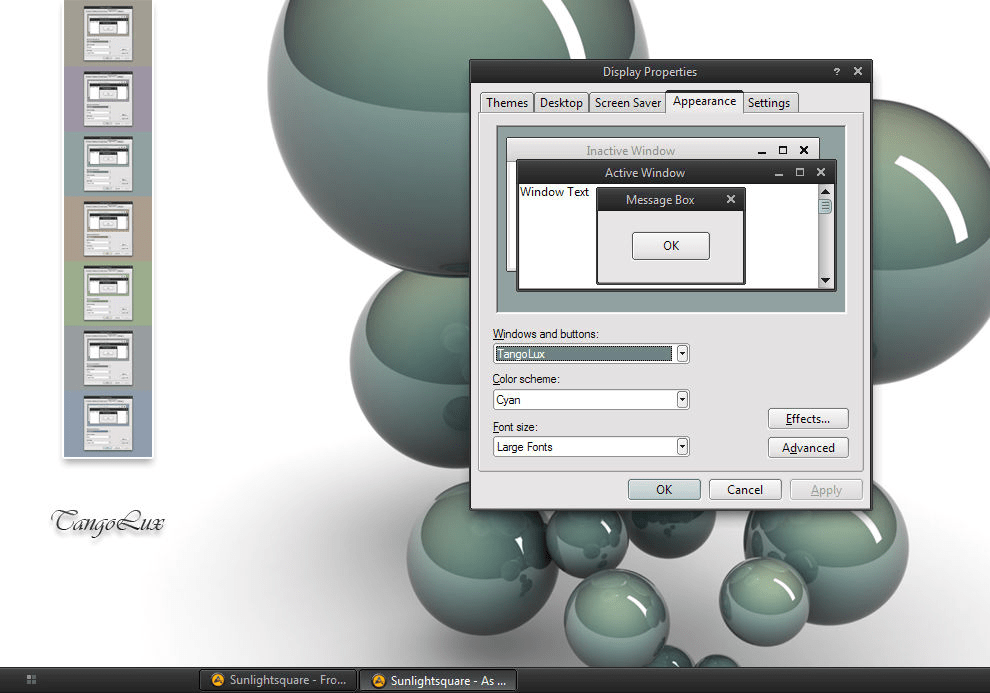
I’m not trying to pick just two themes, by the way. You can head over to DeviantArt and type “windows xp visual style” to see so many other breathtaking results. You might even giggle at how a good handful of themes were released during the 2010s to look and feel similar to Windows 8 or Windows 10.
I find it mind-blowing to browse some of these themes from back in the day and see more recent and occasional comments from people asking if (or simply wishing that) the theme was compatible with Windows 7, 8, or anything newer. Other comments pop up every so often lamenting how great some of these themes still look decades later, how they’ve stood the test of time.
With the right know-how, you weren’t limited to just visual styles; you could swap out new icon sets and even set new system sounds entirely. While patching the file to enable custom themes was not officially endorsed by Microsoft, the point still stands that we had so many choices with minimal effort.
We did have options to run themes like this in subsequent Windows releases, but they were more complicated or fewer and further between entirely. Windows 7 had some rather nice brushed acrylic themes almost like that of Windows 11, but the smorgasbord of options we had with XP was drastically reduced as a whole. On subsequent upgrades of Windows, I would have to run installers to lessen the chance anything went wrong during installation, and even then, modern versions of Windows could easily update and break everything with forced updates. It happened to me on multiple occasions, and there were times during the Windows 8-era when I would be greeted by only a black screen upon login after another drive-by update.
Reason 2: Multimedia Capabilities
Real quick: Does anybody actually remember Windows Millennium Edition (or Windows Me)? I know this seems like a tangent, but I can assure this is relevant. For those in the know, Windows Me is infamous, oftentimes cited on many lists as the so-called worst Windows of all time for one reason or another, although it launched at such an odd time under such bizarre circumstances that doomed it to fail:
- Despite the NT kernel being the next big thing for Windows, Microsoft still chose to ship Windows Me with the an aging 9X kernel.
- Windows Me was generally derided as unstable, broken, and unusable in reviews. Critics reported blue screens, driver problems, and constant stability issues.
- Microsoft released Windows Me when they still made two coexisting versions of Windows for home and business users. For the home users, Microsoft expected everyday people to run Windows Me, but business users got the NT-based Windows 2000 Professional, the latter having much better critical reception.
- By the time Me was released, Windows XP (which came with the NT kernel) was less than a year away. With such negative reception, it made much more sense to hold out on Windows 98 than to bother with Me.
I even recalled using Windows Me in my own childhood! Granted, it was just on my grandfather’s computer at the time, and I would have sworn back in those days that it was a reskin of Windows 98 with how he had everything set up. In my defense, I was 9 years old at the time.
The reason I brought up Windows Me at all deals with the fact that it came packed with many features XP later had that we took for granted, features that made XP such a capable multimedia OS. For instance, Windows Me was the first Windows to ship with the Windows Movie Maker, the same software that later shipped with XP and went on to help shape how we saw the early days of YouTube. Same with Windows Media Player 7 being built-in to XP just like it was with Me. You know the one… the one that you can customize to look just like this.

I could go on about the more seamless USB support and how Space Cadet 3D Pinball was also included with Windows Me like other releases around the time, but the main point is that XP is a very multimedia-centric version of Windows, the true first of its kind to succeed. It did such a spectacular job with multimedia that Microsoft had released promotions for Windows XP Media Center being a possible replacement for the living room TV.
Windows XP was truly ahead of the time with its multimedia capabilities. For anybody who didn’t feel like clicking, this 2002 ad features a version of Windows XP (which would later become XP Media Center Editon) being used for watching live TV, managing digital pictures, listening to music, and even performing local searches.
While many could claim they had easily seen how the landscape was going to shift, how people were going to increasingly use PCs for videos, pictures, music, games, and more, I would argue how said shift really started occurring with Windows XP’s success. While Windows Me at least tried to give us a taste of what the future held, Windows XP succeeded in giving it to us.
Reason 3: XP was Modern
That brings me to my next reason: Windows XP was modern for its time when PCs before then felt more utilitarian for most people, devices we usually relegated to research or work. When XP came along and gave us a taste of its multimedia support, it brought in other aspects of Windows that we take for granted now.
- As already mentioned beforehand, it was the first consumer-based (read: not Windows 2000) version to ship with the NT kernel instead of the antiquated 9X kernel.
- XP contained features such as wifi support (wireless internet laptops were still a crazy new idea in the late 90s when Steve Jobs first showed an iBook G3 with an AirPort card), and better USB plug-and-play support.
- Windows Explorer in XP featured thumbnail previews and the ability to view images in the form of a slideshow if you really wanted. There was more of a demand for this feature back in the day as well.
- XP supported “fast user switching,” which allowed for someone to “logout” of their local account while programs were still running so that somebody else could login to a different local account.
- Already mentioned before, but XP shook up how it looked with the Luna theme instead of having the usual grey bars. Additionally, settings to change it to have grey bars in the UI was there for anybody who didn’t like this change.
- In 2005, Microsoft offered a 64-bit edition of Windows, a time when many systems were still running 32-bit systems, unlike today where 64-bit is the standard.
- Whenever XP seemed long in the tooth, Microsoft kept supporting it with three major service packs, all of which would add more features into XP such as the Windows Security Center from Service Pack 2, which gave users a bird’s eye view of security on the system. Other features added with service packs included Internet Explorer updates, Windows Firewall, the “Pop-Up Blocker” (didn’t work, but hey, Microsoft tried), and countless security hotfixes.
- If you thought Windows Media Player 7 seemed too old-school, you could keep upgrading your version of WMP all the way up to version 11, which looked and felt cutting-edge for its time.
In short, XP didn’t just release in a stagnant state; Microsoft kept updating it through the rest of the aughts. It’s no wonder people didn’t want to upgrade from XP for years. I suspect this is part of why Microsoft wanted to phase out Windows 7 after releasing Windows 8; they didn’t want another repeat of Windows XP where everybody was perfectly happy with it and, subsequently, refused to upgrade again.
Reason 4: No Forced Updates
Something I love about Linux in the present was still a common thing back when XP machines roamed the earth: you only had to update if or when you wanted to. If you wanted the aforementioned service packs, you had the option to install them when you wanted. Simple as that.
Of course, there is an obvious drawback here (I’ll address it soon), but I preferred having this degree of control. If you were worried you were going to forget to install updates, XP let you control automatic update installation, a set-it-and-forget-it approach that didn’t drive us up a wall by disrupting our experience.
Reason 5: XP Was Lightweight

This is likely a result of when XP released in 2001 with the hardware standards being much different, but as time went on, its minimum system requirements looked relatively lightweight. With Microsoft keeping the XP modern with sequential updates and service packs, you would have an extremely ideal version of Windows that did what you needed it to do.
XP did this so well that when Vista came out with its own minimum hardware requirements, most hardware on the market had not caught up (barring a few enthusiasts with outrageously high-end hardware for the time wondering why Vista was so maligned), leading so many of us to believe that Vista was, possibly unfairly, simply built poorly from the start.

It really doesn’t seem like much now, but keep in mind that Windows 7 had the same minimum system requirements two years later in 2009. By then, the market had caught up and hardware had improved sufficiently enough.
I’ve recalled the story multiple times, but when I first got a laptop of my own, it was an entry level system that came with Vista Home Premium. It ran so sluggishly that I found myself missing XP in no time, recalling how good my experience with XP was on the family computer. Of course, my dissatisfaction with Vista’s performance led to my initial discovery of Ubuntu, but that’s a different story. If Linux didn’t exist, I likely would have paid a licensing key to “upgrade” to Windows XP.
On another note, anybody else remember what a mess the Vista lineup was? There were so many different releases such as Starter, Home Basic, Home Premium, Business, Enterprise, and Ultimate. For most consumers, this was too confusing to deal with. How were we supposed to know which one to use for our case and purpose? I even recalled reading a joke someone had written around Vista’s release about what Microsoft would do if they had “Windows Stores” to complete with Apple. They theorized that a Windows Store would have six different entrances into the store labeled with the same names as the Vista editions, the joke being that they all lead into the same store with no noticeable differences.
While XP did have many editions as well by the time it was eventually discontinued, it did start off rather simple while only adding new ones over time, not having half a dozen at launch to confuse consumers. Most people got by with Home Edition and Professional just fine, and other editions of XP addressed specialized needs that made their utility more obvious, such as XP Tablet Edition or XP Media Center Edition.
Alas, It Wasn’t Perfect
While I’ve gushed over Windows XP up to this point, everything wasn’t perfect on it. While there was plenty to like, I would generally say the good largely outweighed the bad. Of course, there were definite drawbacks to Windows XP even back in its glory days.
Security on Windows XP was a joke for a good while. Back when using XP, I recalled catching my fair share of malware. Thankfully, malware hadn’t evolved and become as terrifying as it is nowadays with the advent of ransomware, but it was still common to visit a shady site only to realize that a phony antivirus installed itself to your system without your consent. I recalled my dismay when this happened to me and the Norton Antivirus was disabled by the malware, which defeats the purpose of even running it.
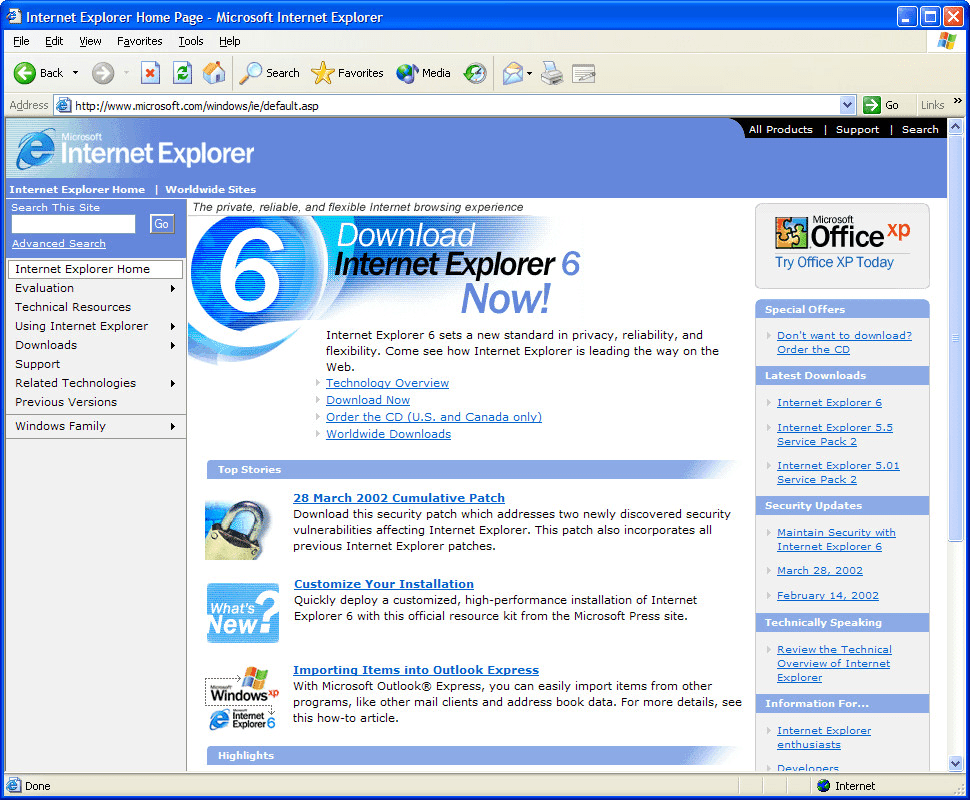
But speaking of poor security, there was also Internet Explorer 6. It’s not a stretch to say that the vast majority of people ran Internet Explorer 6 back in the mid-2000s. Market share for the browser was over 90%, and it was all largely thanks to Windows XP’s dominance. It’s one thing to deride Internet Explorer, but what made it worse for those of us who disliked it was how Microsoft built it into Windows XP. There was no way to remove it, even if you switched to a viable alternative at the time like Firefox or the (Presto-based) Opera.
Internet Explorer 6’s browser always had more holes in its security than Swiss cheese, which made it somewhat dangerous to use at the time, although depending on who you talk to, Internet Explorer was always bad, even before Windows XP’s release. It was only once Firefox started to gain traction that Microsoft felt obligated to release Internet Explorer 7, which addressed many of 6’s shortcomings and lack of features. I’ve mentioned it before, but Internet Explorer 6 didn’t have so much as tabbed browsing support, a feature many of us now take for granted, a feature almost every other alternative browser had at the time. In those days, if you wanted to open two pages on Internet Explorer 6, it had to be in two separate windows. Overall, on top of being such an insecure browser, it also lacked so many quality of life features, which made having Internet Explorer 6 built into Windows XP feel so much worse.

But speaking of security, Windows XP had several vulnerabilities upon release, and that, unfortunately, became a running theme with the operating system throughout its lifespan. Microsoft constantly tried to fix the issues, sure, but more exploits and risks would always be uncovered before we knew it. Despite Microsoft’s attempts to add a security center, a better Windows Firewall, and eventually Windows Defender, XP was simply vulnerable from the start.
While I am aware of how I complained about forced updates on Windows multiple times here and in the past, I can still understand why Microsoft chose this over letting users try to remember. Modern versions of Windows constantly nag us with updates because they don’t want to be as insecure as Windows XP was.
Additionally, I know I discussed how XP had features added into it over time, but it was still lacking in a few places when it came to hardware support. While I didn’t like Vista, its 64-bit variant did support more than 3 gigabytes of RAM more readily. Running 4 gigabytes or more RAM on XP wasn’t really a thing without making everything complicated with workarounds like using RAM disk software or messing with the kernel. There was also the obvious solution of installing Windows XP 64-bit, but the mainstream world really wasn’t ready for 64-bit support when that first released. The few people I spoke to who actually used 64-bit Windows XP as their daily driver thought it was a little annoying to use, that 32-bit XP had more support overall.
While anything above 4 GB was largely more RAM than anybody would ever need back when XP first launched in 2001, people were still using XP past 2010, when having 4 GB of RAM was reasonable. Yes, even as great as Windows 7 was when it launched in 2009, XP still coexisted alongside it for several more years.
The future was already here, and many enthusiasts were still loyally running XP all the way until its extended support ended in April 2014, and that’s not counting the support for Embedded POSReady 2009 XP, an edition of Windows that was 1-to-1 compatible with Windows XP Professional, which ended in 2019. While most users wouldn’t daily drive a “Embedded POSReady” edition of Windows XP designed for such a specialized purpose, enthusiasts of the aging OS quickly found ways to funnel those security updates into their existing installations.
In short, it took 18 years for XP to finally stop seeing support, a truly remarkable lifespan for the legendary operating system. While Microsoft was adding some features in over time with service packs and updates, they really wanted the world to move on already, and many users found Windows 7 good enough to succeed it for a long while.
How Was Your “XPerience?”
Windows XP meant a lot to me, and I don’t think we’ll ever see another operating system in general, much less version of Windows, that ever comes close to capturing that same feeling. What did you think of Windows XP? If you ran it, when and how long did you use it? Did you prefer a different version of Windows like 7, or did you think Vista, 8, or 10 were just fine? On the other hand, did you find XP overrated? Maybe you think Vista and Windows 8 got the short end of the stick? Feel free to comment if you have something to say. I’d love to know what you think.
 Sudo Science
3 responses to “Windows XP Is Still My Favorite Windows of All Time”
[…] countered immediately with how I actually enjoy Linux, how I last truly appreciated Windows back when XP was the latest and greatest. Despite how using Linux can be a little more difficult, it’s easy to appreciate when you […]
LikeLike
[…] reason. After all, Windows XP was still supported, and I have already gone at length about how much Windows XP is and will always be my favorite Windows release of all time. As a result, I usually would turn up my nose at the time at the idea of getting an Apple device. […]
LikeLike
[…] you may know that I primarily grew up running Windows. I’d even say that’s part of why Windows XP is and always will be my favorite version of Windows of all time. I only actually started to become a Linux user for the first time in 2008, when I started college, […]
LikeLike