
I don’t use social media. If you looked on my phone, you would be hard-pressed to find anything like Facebook, Twitter, Instagram, TikTok, or Reddit. I get that so many people rely on social media to keep up with what’s new these days, but I prefer to curate RSS feeds and read what I want without added noise.
That said, there’s no shortage of RSS apps and feeds out there. I was once a devout user of Feedly back in the early half of the 2010s. While it may be free to get started and synchronize all of your feeds on one account, I wanted something more without having to pay a subscription.
A few years ago, I set up a Nextcloud server for the first time and discovered how I could get more bang for my buck by setting up additional apps and services on my server. What would be seen as a server for cloud storage could easily become so much more! The additional app I gravitated towards right away was the News app.

That said, I’m not the biggest fan of the online interface. Even though it can fetch the feeds, the user experience feels clunky. Just like my email, I prefer to use a desktop client rather than opening a browser to check my RSS feeds. Thankfully, Nextcloud’s open nature comes to the rescue; we can pick apps we like and curate our RSS-reading experience to our liking even further.
Fluent Reader: A Desktop Client for Nextcloud News
While I already use the free Nextcloud News app on Android (you can easily find it on F-Droid for free), I didn’t think I had many options for reading my synchronized news feeds on my desktop until I stumbled upon Fluent Reader, a cross-platform RSS reader app that synchronizes with several services. The app on Android goes for $1.99 on the Play Store, and I am somewhat tempted to try it just to support the developer for a job well done, but the desktop app is free on Linux.
Fluent Reader is 100% compatible with existing Nextcloud News feeds and configurations. Setting everything up was easier than I anticipated, too.

How to Install Fluent Reader on Linux
There are several ways to get your hands on this app. While I hadn’t realized it was available on Flathub at first, I also have the AppImage for it. To install the Flatpak version of Fluent Reader, just run the following command in your Linux terminal (assuming you have Flatpaks setup and configured already):
flatpak install me.hyliu.fluentreaderOtherwise, if you want to do what I did, you can download the AppImage here, make it executable with a chmod +x command, and put it into your existing directory of AppImage files. If this seems difficult or you lack an AppImage “setup,” I would just go with the Flatpak install, even if it runs a little slower on my end.
How to Setup Fluent Reader with Nextcloud News
The first time you run the app, you’ll be greeted by a blank window that reads “No articles” with some controls in the top-right corner. Click the gear and navigate your way to the “Service” tab.
In the drop-down menu, select “Nextcloud News API.” You should see this window pop up now:
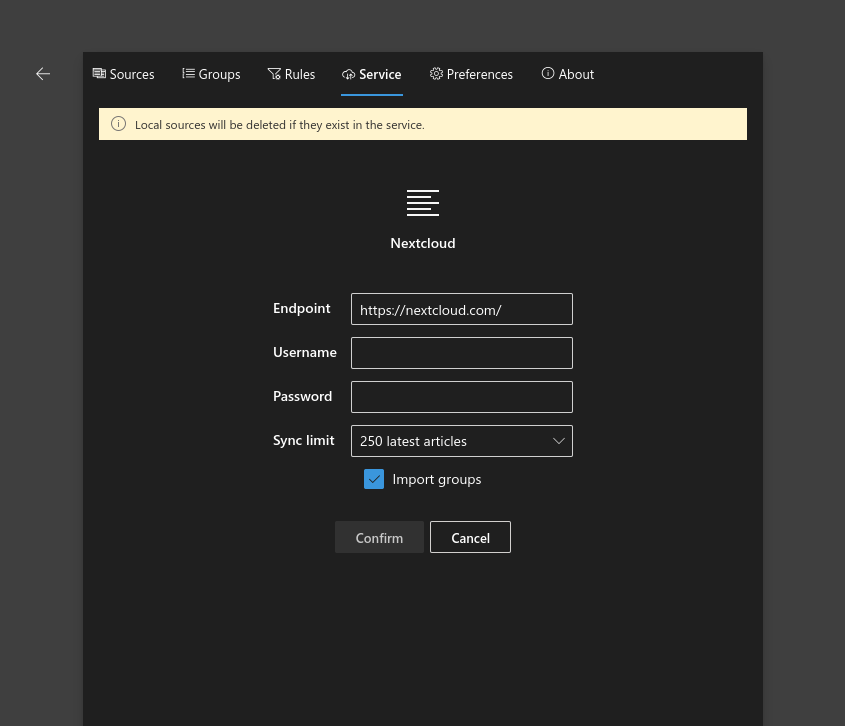
Throw in your endpoint URL from your News server. I believe this should simply be the direct URL to your Nextcloud server (I tested it earlier with the Flatpak). Treat it as if you’re logging into just another app that needs your Nextcloud credentials.
Next, put in both your username and password for the Nextcloud server. If you have app passwords enabled for added security, you’ll need to generate another app password to copy and paste into the password field.
Afterwards, you can set up your desired sync limit for how many articles you want to be stored on your system at a time. While you can set it to unlimited, the app doesn’t recommend that. I imagine it has to do with a larger number of feeds slowing down the app.
Once you have everything to your liking, hit Confirm and, if everything works, you should have no problems connecting to your Nextcloud News server.
UPDATE: What’s It Like a Few Days Later?
I decided to make this update several days after publishing this. I’ve noticed that my AppImage of Fluent Reader is much more reliable overall than the Flatpak counterpart. Both apps are on the same version as one another (1.1.3 at the time I write this), yet my Flatpak doesn’t feel like synchronizing my feeds anymore from when I last did so several days ago. The AppImage, on the other hand, had no issues with sync. This might differ for other users, but it’s just something to keep in mind. YMMV.
Configuring Feeds Later
You can add feeds to your online Nextcloud News app and they’ll sync over to your Fluent Reader setup. It’s that easy. Fluent Reader also supports starring articles and having them synchronize over to your server as well.
That’s really it. Do you like the app, or do you prefer a different RSS app entirely? If so, does it sync up with Nextcloud News?
 Sudo Science
2 responses to “Setting Up Fluent Reader with Nextcloud News”
[…] Of course, you could be a bit more like me and use the browser extension. While I do like using feeds and everything to keep up with content, I find that adding feeds can quickly become chaotic, especially if you add three or more that regularly update. It becomes difficult to keep up with everything, and it becomes rather tempting to simply not read things as your feed clutters up, the same exact issue I’ve had whenever I try to go back to reading articles on my RSS feeds. […]
LikeLike
[…] I was honestly shocked at how dead simple it was, especially after how I had occasional issues syncing my Nextcloud’s RSS to a dedicated reader. As expected, adding my workplace Google Calendar and keeping things separated and easy-to-use was […]
LikeLike