

UPDATED on July 22nd, 2024. Scroll down to read more information on how I eventually switched full-time to Betterbird.
I talked a short while back about how I recently adopted Betterbird as my email client after having used Thunderbird on my old Arch Linux system. To put a long story short, I decided to search for Thunderbird on the AUR and stumbled across Betterbird upon reading its description:
Betterbird is a fine-tuned version of Mozilla Thunderbird, Thunderbird on steroids, if you will.
Betterbird Home Page
That originally got my attention, so I decided to install the binary from the AUR. I used it for a while since then and I’ve been somewhat satisfied overall with the experience. I can tell the Betterbird team really does care about what they’re doing.
What I found a little odd about the project at first was how almost nobody talked about it in the first place, or at least in English. Searching for “Betterbird” on YouTube yielded me one video in English and then a couple more in German and Spanish respectively. Keep in mind that I saw none of the videos, as I wanted to discuss things more organically rather than feeling like I had to observe what these videos may have discussed. That, and I’m far from fluent in the latter two languages.
Something that I did find stranger was how the first few results unrelated to Betterbird were from prominent YouTubers in the Linux space (TechHut and DistroTube) taking a close look at Mailspring. Mailspring was a client I did hear about at some points in passing but put off checking out. After this reminder, I decided to take a look at that program as well with another AUR command.
yay -S mailspringI Thought This Would Only Be About Betterbird?
Originally, yes, I was planning to only discuss Betterbird, but even as I looked deep into what I had to work with, I realized that Betterbird was only a little better than Thunderbird in my experience, hardly deserving of the “on steroids” moniker. It is an excellent project and it is good to see an open-source app like it flourish, of course, but a lot of the improvements were just things that felt like quality-of-life fixes at best. In fact, I only had a one notable thing to discuss that seemed like a major improvement me over vanilla Thunderbird.
Multi-line View is AWESOME!
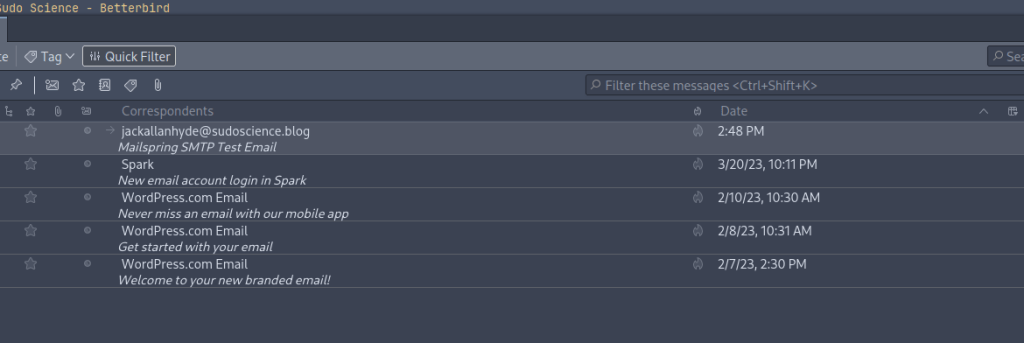
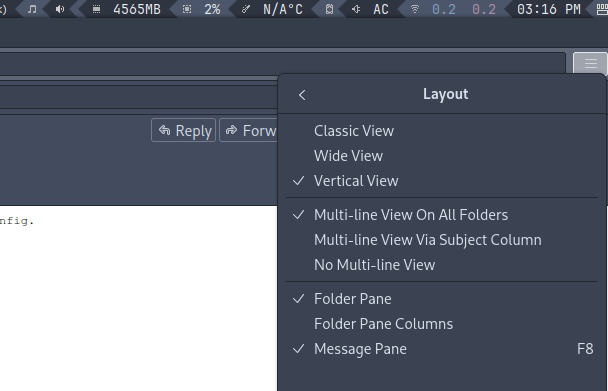
I love this feature. If anything, I would say this is a good reason alone to switch for any Thunderbird diehards out there. I know it seems so minor, but I had no idea I ever wanted it until I actually had it in my hands. Enabling the multi-line view is not difficult at all either. All you would need to do from a Betterbird install is go to the menu and select View > Layout > Multi-line View On All Folders. Why this isn’t in regular Thunderbird is beyond me.
What About the News Feed, Chat, and Calendar features?
I understand that these are improved somewhat over their Thunderbird counterparts, but frankly, I haven’t bothered to use them for various reasons:
- I have a news feed app set up on my Nextcloud server, so I just default to that whenever I want to look at RSS feeds that are relevant to me and my interests. Trying to juggle anything else is more of a hassle than it’s worth.
- I don’t really use chat apps anymore these days. I did like messing around on IRC chats way back in the day, but I haven’t done that in well over a decade.
- Using a digital calendar kind of annoys me compared to going analog and writing down events, which is a major part of why I delegate events to a bullet journal.
So in other words, the other things I could have tried out were nonstarters for me because I had no need to use them. Sure, I could have demoed a quick RSS feed, I could have linked a random Google Calendar (ick), and I could have connected to some chat to give a quick test, but I wanted to discuss actual use of the features rather than a quick, cursory glance. Actual, thorough use of the features would be a much more accurate reflection of the experience than taking a look at it for five or ten minutes.
I’m certain they worked perfectly fine and as-expected, perhaps with a few differences here and there compared to Thunderbird, but I didn’t really see the need to give them a serious try.
Betterbird Systray Didn’t Work For Me
I know this one is a minor thing, but I really did want to get systray Betterbird working. Perhaps it was something with my configuration, or maybe the betterbird-bin on the AUR had an issue with it, but I didn’t get anything going. Nothing from Betterbird ever popped up on my notification tray.
I looked this up during the time I was using Betterbird and found this Github thread where the Betterbird developer discussed how they attempted and planned to make it work. To be fair, this did look extremely difficult and I can’t fault them in the slightest considering they actually did do something.
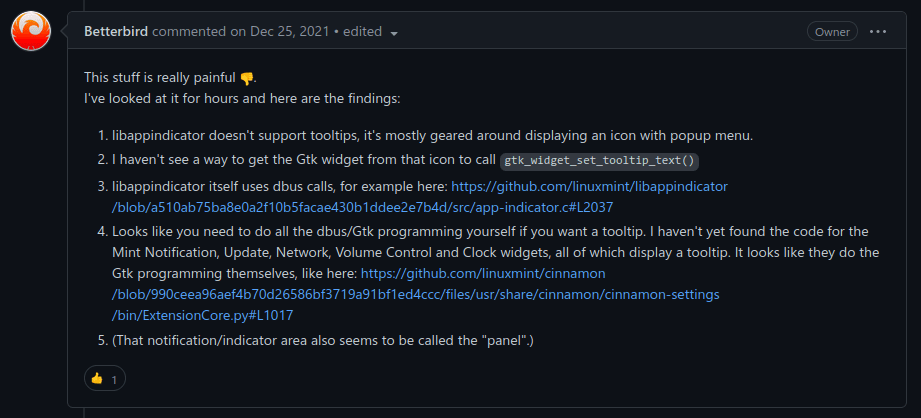
Getting this feature running, at least upon glancing at this post, seemed hard, but I applaud the devs for their transparency on this matter as well.
The feature is supported and working on Windows, at least according to another screenshot in that thread. The end of the thread even leads me to believe it was working on Linux eventually, as evidenced by users of KDE and Manjaro confirming it, so it’s more than likely a problem with my current configuration rather than Betterbird itself.
There is a chance I’d get it working much more easily if I used a dedicated desktop environment like Cinnamon (some of the sample screenshots of it look like they were taken from Linux Mint) or maybe KDE, but I like my tiling window setup too much on Awesome, and I don’t want to install an entire desktop environment just to see if I can get the icon working.
Betterbird Overall?
While I still think calling the app “on steroids” was a bit of an exaggeration, I still think it’s solid overall.. In fact, I wouldn’t hesitate to recommend Betterbird to somebody who:
- Is tired of how Thunderbird feels on Linux in general.
- Wants more bug fixes and quality-of-life improvements than the Thunderbird team is willing to deliver now.
- Really digs the multi-line view and loves the idea of it being in Thunderbird.
- Uses a better-supported desktop environment and wants Thunderbird to have a systray icon out of the box.
- Wants to support an open-source project.
Maybe I didn’t get the full experience by skipping out on the calendar, chat, and news features, after all, but I can easily appreciate what this developer (or developer team) has been doing for Thunderbird.
So How Does it Compare to Mailspring?
Feeling I had little to discuss overall, I decided to give a closer look at Mailspring.
Despite its proprietary nature (you’re urged to pay $8 a month to upgrade from Mailspring Basic to Mailspring Pro to get more features), I really do like the experience. I don’t like to admit, but Mailspring is giving me more in terms of what I actually want from a Linux email client. In fact, the big thing that got me to pay attention to Mailspring was this:
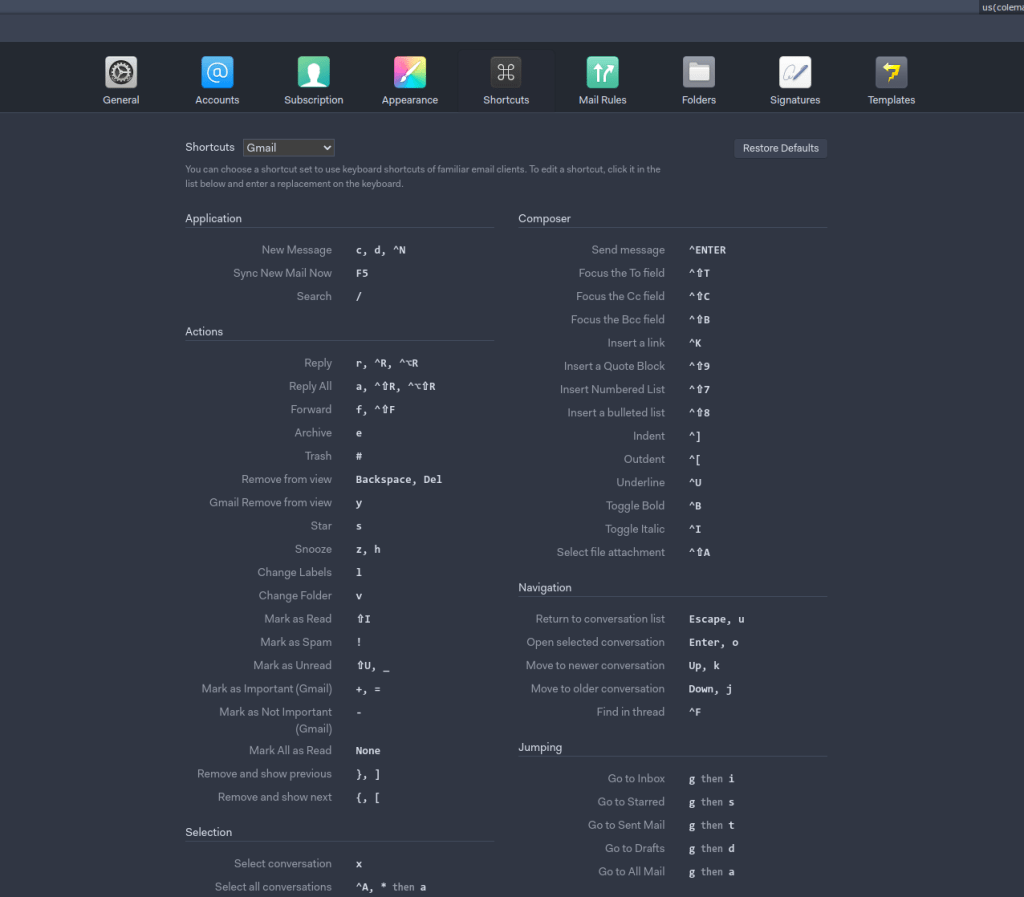
I was already accustomed to using Gmail’s default in-browser shortcuts from my work email account, but having them usable in one unified inbox for both my work AND personal emails? That’s a dream for me. Even if you don’t “click” with one shortcut or another, you can customize them as well. As I discussed on my previous blog posts about keyboard layouts and switching from Windows, I love my shortcuts.
A few other things about Mailspring, in the relatively shorter time I’ve been using it, have impressed me so far as well:
- The systray icon actually works for me out of the box in my Awesome WM setup! Nice!
- The window controls can be set to better accommodate my window manager’s lack of window buttons (I have no close, minimize, or maximize buttons on my setup).
- The UI feels more polished as a whole and themes feel nicer. Even the same Nord colors I use on Mailspring somehow feel more pleasant than they do on Thunderbird or Betterbird.
- You can “snooze” received emails and act on them again later. Especially useful for someone who treats emails as tasks or wants to attain “Inbox Zero.”
Unfortunately, you have to pay for Pro to get a few things like read receipts, activity insights, templates, send later features, and a little more. Yeah, despite how nice it is, Mailspring is not an open-source app. If this sort of thing concerns you (and I can get why), Betterbird is a much better choice, as you would still be supporting an open-source project while saving $8 a month. Personally, I don’t mind using a proprietary app here or there (I use Microsoft Edge on Linux for work-related tasks), but I know this can be a deal breaker, especially on this platform.
Additionally, Mailspring seems to be only for email. Unlike Betterbird supporting news feeds, chat, and a calendar setup on top of viewing and writing emails, Mailspring only does emails. If you want more of a Swiss army knife, Betterbird fits the bill better.
In Conclusion
One app isn’t inherently better than the other; that’s not the point of this whole comparison. Rather, I decided to highlight two excellent email clients for Linux and see which one I ultimately preferred. In my case, I’m going to continue using Mailspring, but Betterbird could fit someone else’s needs better than they fit mine and vice versa.
UPDATE as of July 2024
A good while back, after an update Mailspring released, it stopped working for me. I was unable to get everything working the way I liked again, but that wasn’t an issue, as I still had Betterbird all set up from when I first tested it.
And you know what? Everything was working great when I started to use it again. Unlike the first time I used it, the tray icon was actually working fully this time around! So for the past several months, I’ve actually been using Betterbird instead of Mailspring.
Unfortunately, for the past several weeks now, Betterbird has started to crash on me when I open emails. I suspect this might be in part because I use Hyprland now instead of anything xorg-based for my desktop, but I’m not entirely sure. There’s a chance I need to clear some unused data or a lot of really old emails that possibly crash it. Speaking of that, I tend to notice that Betterbird is most likely to crash when I browse through “All Mail” in my Gmail account dedicated solely to e-commerce. I’ll report back if anything changes with what I attempt to do now, although everything I said about Betterbird’s multi-line view still stands as an awesome feature. END UPDATE.
What email client do you use on your Linux system? Or do you simply check your email from a browser or mobile app? If you used either Mailspring or Betterbird, what was your experience like? Did you get the Betterbird systray icon working if you tried it on Linux?
 Sudo Science
8 responses to “Betterbird and Mailspring: A Comparison of Email Clients for Linux”
Does the system tray icon work better now in BB 115?
LikeLike
I’m not sure, honestly. I haven’t touched Betterbird since the time I originally wrote this post, but I could take another look soon on both my Arch and Fedora systems in the coming days.
LikeLike
Upon reinstallation and reconfiguring, I’m happy to report that the systray is indeed working better on more recent versions of Betterbird.
LikeLike
Is there a “Unified” email view in BB? I like to see any and all “new” emails in one place. Also, Mailspring created a Mailspring folder in all of my different email addresses. Not to happy about that. It’s showing up in my mobile email client (K9) and BB. Anyway to make sure the Mailspring folder is gone for good? I’m thinking I’ll stick with BB.
LikeLike
Yes, the same “unified folders” that Thunderbird has.
LikeLike
[…] calendar app, but a consolidated app that primarily uses email. I’m already using either Betterbird or Mailspring depending on when I publish this, so why would I want to go through the setup process of entering […]
LikeLike
[…] didn’t stop there. I was working on getting Mailspring to work again using a Snap, but I found myself curious enough to try BlueMail, especially […]
LikeLike
Does it bother anyone else that Mailspring is creating Mailspring folders on the mail server? Any reason for this Mailspring folder? Never had a mail app do this…
LikeLike