
It’s surely been a while, as 2026 is now approaching. Quite a bit of time has passed since I stopped using the whole BASB “Second Brain” system as conceived by Tiago Forte, almost two months to be more specific.
However, that doesn’t exactly mean I stopped using Obsidian altogether. When it comes to meaningful note-taking and knowledge development, I have since started building an Antinet Zettelkasten on good old-fashioned notecards. When it comes to managing my life in general, I still use my tried and true bullet journal.
Still, Obsidian is still a powerful tool overall. Was it worth really throwing away the contents of my vault, formerly my “Second Brain,” because I wasn’t following the BASB system anymore? Or could I still get some utility out of Obsidian?
Rethinking My Obsidian Setup

I turned to ChatGPT to analyze how I was doing things with my setup so far, explaining the following:
- How I started an Antinet Zettelkasten and continue to use a bullet journal.
- How I foolishly attempted to mix Zettelkasten-style alphanumeric filing with PARA a while back (which proved to be a mistake in more ways than one).
- How I still wanted to get some genuine use out of Obsidian without it overlapping with the Antinet or my bullet journal’s usefulness.
- How I had issues trying to use the Archive in PARA with my Zettelkasten-like alphanumeric name setup.
I guess I don’t know what I really expected, but ChatGPT noticed what I completely failed to see.
In short, PARA and alphanumeric naming schemes conflict with one another, creating a lot of unnecessary friction, which I had already witnessed for a while. ChatGPT, in its usual “It isn’t X, it’s Y” writing style peppered with em dashes, explained how the two designs are contradictory to one another, making them incompatible in the way I tried to mesh them together.
What resulted afterward was truly extraordinary, especially considering it came from the likes of ChatGPT. Honestly, while I do like to troubleshoot or plan things with AI at times, I understand that it can spew things out that are half-baked and require intervention on my part to make them any good. I generally don’t mind; I still feel that AI is still useful as long as we never truly forget the human element.
Still, I didn’t expect this at all. ChatGPT seriously came up with the nearly perfect setup for my needs based on all of our chats so far, making for an extremely personalized system.
Ditching PARA Once And For All
100 Projects & Creative Work
200 Education
300 Technology & Devices
400 Personal Systems
500 Media & Entertainment
600 Spiritual Life
700 Fitness & Health
800 Life Admin
900 Archives (from all categories)
This is the suggested output that ChatGPT initially came up with. It’s an excellent start, but required just a minor amount of customizing and tweaking.
ChatGPT suggested making all of the above my master folders in my Obsidian vault. From there, I would organize everything based on nested folders within based on those areas, including developing, as the AI suggested, an internal archive folder within each category.
For example, here’s what it suggested for the 100 folder listed above.
100 Projects & Creative Work
    110 Novel Writing
    120 D&D & Worldbuilding
    130 Art & Creative Projects
    190 Archive
From here, I was able to simply name new notes and files with standard names within these folders. No numbering necessary. When something is no longer relevant, I simply move it to the self-contained archive folder within this category. In fact, every folder contains an X90 directory specifically for archiving files that are no longer relevant. For example, if I have something that’s no longer relevant under 400 Personal Systems, I can move the file into the 490 Archive folder within that directory.
However, I didn’t like that there was an additional 900 Archives folder added outside of it, so I repurposed that into 900 Utilities for storing the handful of templates I actually do use in Obsidian as well as my reference list of Vim-like shortcuts. I also took the liberty of adding a 000 Inbox folder for anything I need to note quickly, which I haven’t had to use very often just yet. It’s mostly there in case I don’t have my pocket notebook within reach, which is rather infrequently, but it’s nice to have the option. This folder also includes my README file that explains the directory and setup in case I forget for whatever reason.
Why Use This Instead of the Zettelkasten or Bullet Journal?
I realized that I could still use Obsidian as more of a practical tool instead of trying to dump my entire life into it digitally, instead of obsessively “linking my thinking,” instead of attempting to develop serious knowledge with it. In short, I’ll likely still add it to Obsidian if:
- I don’t need to develop knowledge with what I’m saving.
- I want to save it without having to write it repeatedly in bullet journals or dig them out and re-reference them over and over (“threading,” as Ryder Carroll calls it, only does so much for me).
- It’s a piece of digital media that can’t really be embedded in my other analog setups.
If it comes to something like anything I’m citing or referencing in my Antinet Zettelkasten, I set up Zotero just for that on my main devices, so Obsidian isn’t necessary for that either.
While I know this isn’t a whole lot, it’s still something that makes Obsidian feel like a great utility.
Elaborating On My Setup
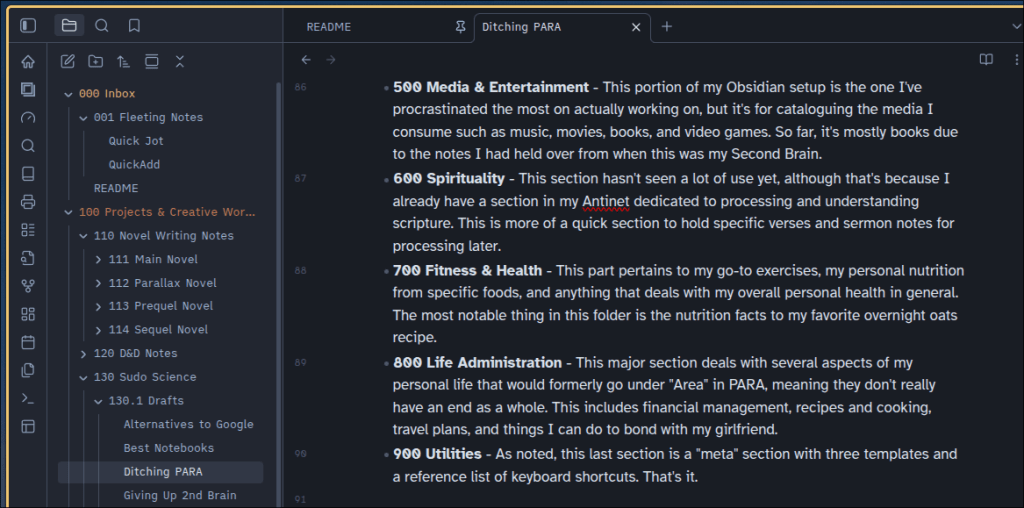
With that minor amount of tweaking done, here’s how I set up and started using these directories.
- 000 Inbox – A place for my README and my fleeting notes.
- 100 Projects & Creative Works – I tweaked this to suit my needs with notes for my novel-writing, drafts for what I want to post on this site (I have a few unfinished drafts sitting here), and tabletop gaming notes as well.
- 200 Education – This is for my ongoing self-education endeavors, such as teaching myself new skills (like guitar) or languages (Japanese and Mandarin at the moment). I document resources I’d like to repeatedly reference in this folder, and I also use it to catalog my extensive stationery collection that I can use for self-education. (I might have a problem.)
- 300 Technology – This pertains to everything related to my technology, whether that’s my current Linux setup, commands to know, my server setup, older computers I tinker with, and my video game hardware.
- 400 Personal Systems – This directory is dedicated to tracking what’s going on in my completed notebooks (including archive names and physical descriptions to help me dig them up faster) as well as my now-simplified life gamification setup (which I really should update on sometime). I also keep a handful of old notebook pages in here that I wrote and scanned years ago.
- 500 Media & Entertainment – This portion of my Obsidian setup is the one I’ve procrastinated the most on actually working on, but it’s for cataloguing the media I consume such as music, movies, books, and video games. So far, it’s mostly books due to the notes I had held over from when this was my Second Brain.
- 600 Spirituality – This section hasn’t seen a lot of use yet, although that’s because I already have a section in my Antinet dedicated to processing and understanding scripture. This is more of a quick section to hold specific verses and sermon notes for processing later.
- 700 Fitness & Health – This part pertains to my go-to exercises, my personal nutrition from specific foods, and anything that deals with my overall personal health in general. The most notable thing in this folder is the nutrition facts to my favorite overnight oats recipe.
- 800 Life Administration – This major section deals with several aspects of my personal life that would formerly go under “Area” in PARA, meaning they don’t really have an end. That includes financial management, recipes and cooking, travel plans, and things I can do to bond with my girlfriend.
- 900 Utilities – As noted, this last section is a “meta” section with three templates and a reference list of keyboard shortcuts. That’s it.
One other aspect of my setup is that I try to use as few plugins as I can comfortably get away with. I used to waste so much time tweaking and installing third-party plugins, enough to the point that I could have used that time to read books, practice new skills, or just about anything else that matters more.
How Is It Working So Far?
I initially made the mistake of alphanumerically naming my notes to correspond with the folders they were nested in (oops) before later fixing this issue. Now the archive setup in each folder makes much more practical sense for my needs.
Now, after nearly two months of using this setup, I’m pleased with how practical and genuinely useful Obsidian feels. Now it feels like my vault serves me instead of me sitting here and trying to link everything together just for the sake of eye-popping bubble graphs or superfluous tagging systems. I’ve finally made Obsidian compliment my analog tools instead of feeling like an extraneous app I used to really use for everything.
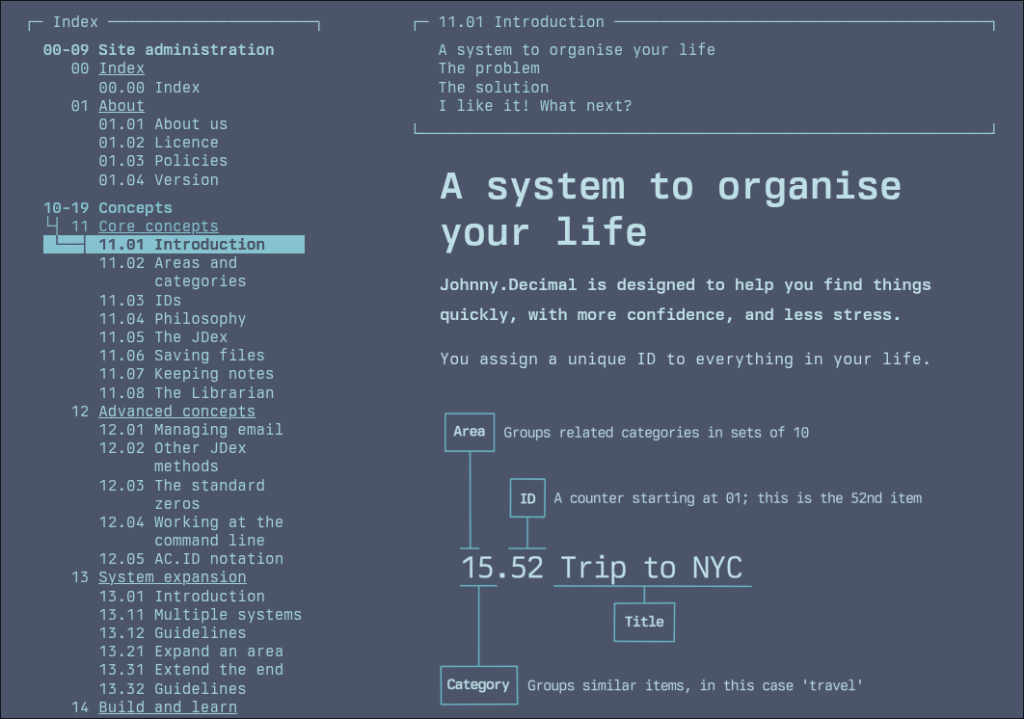
Granted, even if I didn’t use this system that ChatGPT happened to suggest, I likely would have settled on something that seems reasonably effective like a modified version of the Johnny Decimal system. Of course, the system ChatGPT recommended to me was personalized to my needs, so I can see just about anybody tweaking or changing this to suit his or her needs better. For instance, someone who’s not religious could replace the Spirituality folder with something else entirely.
More importantly, ditching PARA, the last thing I praised in the BASB system, has only made my Obsidian vault feel more useful than ever before.
Do you use Obsidian or any other digital note-taking apps? How exactly do you use said app(s)? Do you go for a full-on “Second Brain” setup, or do you try to keep things more practical and streamlined? Do you use any analog tools to offset your digital ones? Or is this something you never really thought about before? Whatever it is, feel free to leave a comment with your perspective. I’d love to know what you think about this subject.
 Sudo Science