
I hinted at the possibility a good while back, but I’ve been rethinking how I enjoy my music over the past few months, and that’s also despite how I said this a good while back now.
Why go through all this trouble [with TIDAL, Spotify, and others] when you could just host the music yourself and stream it from your own media server?
[…]
Still, going back to music streaming as a whole, I am a rather pragmatic person, so readers in the future shouldn’t be surprised if I somehow change my tune on all of this by sometime next year and actually try hosting my own Jellyfin server (or whatever other server-side hosting software) to stream music.
I still totally called it.
As of now, I have finally cancelled my TIDAL subscription.
No, I’m not switching back to Spotify; I’m not switching to Deezer after all; I sure as hell won’t bother with YouTube Music.
I was still quite happy with what TIDAL offered me, but lately, I’ve continuously been confronted with the idea that the digital entertainment we pay for is still not ours.
This has been something I’ve mulled over for the past four months now. I have continuously paid for a service with a lower price and higher audio fidelity than Spotify, but no matter how I slice it, no matter how often I tell myself that there’s more music there than I can ever hope to listen to in a lifetime, I can’t avoid the reality:
No matter how much I pay in the long run, I still don’t own any of the music.
What Am I Going To Do About It?

I might have hinted at it, but in case I didn’t or anybody else forgot, this isn’t the first time I seriously considered ditching streaming music services. In fact, I successfully did so back in the summer of 2022, back when this site was merely an idea I hadn’t acted on. It was part of an experiment to see if I would miss Spotify if I chose to only use my aging MP3 collection again.
How did that turn out, exactly? I may consider writing about it in more detail in the future, but to summarize: I went a good six months without Spotify, only opting to listen to my already downloaded or ripped offline music in my collection.
The straw that broke the camel’s back and made me return to Spotify by 2023, however, was Spotify Wrapped. (Remember when Spotify Wrapped was good?) Seeing the results from others filled me with envy over how my Wrapped would have looked like if I had listened for the entire calendar year, so I came crawling back.
Fast forward to the spring of 2024 when I switched to TIDAL, and Spotify Wrapped this past year happened to be underwhelming enough that I didn’t consider switching back again. I used TIDAL ever since… Until now.
What Changed Exactly?
Several small things have changed that made music less convenient for me to listen to outside of my house or office than ever, but the biggest deal-breaker is currently my Clicks for Pixel 9. Despite the peripheral’s drawbacks, I have grown used to the keyboard and continue to use it months after I got it.
However, the biggest weakness of the Clicks for me is that audio passthrough with a cable is nonexistent. You can put the keyboard into “data passthrough mode,” you can use an adapter with a built-in DAC, but the result will always be the same. The Pixel 9 will only be able to play music through its internal speakers or via bluetooth as long as the Clicks is attached.
Regardless, even if this weren’t such an issue, most of my music-listening used to be during my long commutes. I would drive 35 to 40 minutes to get to work, and then another 40 to 45 minutes back home due to rush hour traffic. While I don’t want to go back to a long commute, one of the few advantages was how much time I had to listen to music.
Note that I said would, as in past tense; I’ve had a different job now with a far shorter commute. I was wise in picking an apartment complex within walking distance of my new workplace, so good riddance to the long drive. However, even before I got the Clicks keyboard, it would sometimes take several minutes to decide on which playlist I wanted to listen to for my commute, and considering how short the drive is, it felt like a waste of time opening TIDAL at all if I was going to be at work in well under three minutes.
These shortcomings had me listening to my in-car radio again, and this has carried over to my trips around town to get groceries or run errands. However, the same two stations I listened to (a rock station and a country station for when the rock station is on commercials) got rather stale.
There is something to be said about how I would light up when a song I really like got played on the rock station, but I want to go back to having control of what I listen to. That’s not just in the car, but in my home, my office, during my workouts, or wherever I may roam.
The Organization Process

I mentioned it briefly when discussing alternatives to Spotify, but I am a massive neat freak when it comes to my music collection. It’s no understatement to say I like to have everything tagged meticulously and to perfection with the proper album art and genres.
When I considered this entire endeavor, I knew it was going to take time to tag an otherwise neglected music collection properly. In fact, during some downtime at home, when I wasn’t trying to earn XP in my gamified self-improvement system, I would go through my library and start updating tags manually.
It took a considerable amount of time and effort, but it came together little by little. It was also a good time to realize I was lacking some music I would have wanted to listen to, so I went out of my way to update my collection with more tracks. I have to say I love when an artist puts up an album on a site like Bandcamp with a reasonable price and your choice of so many music formats.
It’s only more difficult when a smaller artist only puts music on streaming services or YouTube without an option to buy. That happened to me with Become The Knight and two of his songs: “Won’t Be Saved” and “At One (Won’t Be Saved Pt. 2).” I adore both of these songs, but I could not find a way to buy them. After failing to find a way to purchase them, I had no choice but to break out yt-dlp and get some tagging done with a separate program. It’s a last resort option for me because it’s so inconvenient to tag all of the minutiae manually. (If this changes in the future, I’ll be one of the first people lined up to buy the MP3 downloads for these two songs from Become The Knight.)
After about two weeks, everything came together, and my music collection is cleaner and more organized than it has ever been before. Fast forward another month and many, many Amazon MP3, Qobuz, and Bandcamp purchases later, and now I finally did it. I finally have an offline music collection with parity of what I listened to on TIDAL and Spotify and then some.
Other Ways to Enjoy My Music Collection
I am well-aware of how I didn’t like the idea of having to stream my own music with my own hosted solution. I thought it would have been a lot of work and effort that likely wouldn’t have been worth the effort for what I was getting.
Fast forward to a month ago when this entire project began, when I realized I had a 2017 Mac mini lying around collecting dust. I already mentioned my friend before, the same great guy who was generous enough to lend me his M1 MacBook Air with no strings attached (except one: not to install Linux on it).
I bring my friend back up because this isn’t the first time he’s freely lent me or even given me an Apple computer without expecting it back. A few years before that, he let me have his Mac mini, a 1TB model that he had lying around, because he thought it was too slow compared to his other systems. While I spent my own money to upgrade the storage within to accommodate an SSD (Thanks, OWC!), subsequent upgrades of macOS made the system feel like it was crawling slower with each upgrade.
After hitting Monterey, it seemed like the computer would only become less useful over time barring a Linux installation. Soon enough, I, too, had the Mac mini put away in a box of wires and cables.
However, I then saw this video recommended to me on YouTube:
This idea intrigued me, and it’s even something my friend dabbled in at some point in the past with his own personal NAS, although he bought an actual Synology model with so many cool features years ago. While I’m not sure if he still uses it (I should really ask him sometime; maybe I will if he reads this and reminds me), I realized that I wouldn’t necessarily have to buy a specialized piece of hardware to do most of the same work a NAS could do.
Then it dawned on me: Why not use the Mac mini as a server?
The process was honestly quite fun and more than welcome at this point in my life. While I won’t go into detail, I have been having a rough couple of months, and this project was an enjoyable distraction during my downtime from work.
Now here I am, a few days of troubleshooting later, with a Mac mini streaming server of my very own:
- Jellyfin runs on top of macOS Monterey.
- I copied over my neatly-organized collection of music as well as my videos and movies that I’ve accumulated over the years. On top of kicking the likes of music streaming to the curb, I can do the same with video services like Netflix too!
- I have it running 24/7 so it’s always ready to stream.
- I got a free domain from a recent promotion, so I decided to use it for accessing the server from any of my devices wherever I go.
- I got Cloudflare running to set up https on the server.
- I have a fully-headless setup thanks to a VNC client on my Arch Linux system.

The “https” part was the hardest because I kept trying to use Caddy, but after consulting ChatGPT for several hours at a time for troubleshooting, it never worked no matter what I did. I wasted a lot of time trying to figure out why Caddy wouldn’t just do what I wanted it to do.
Cloudflare, on the other hand, was far easier to get working!
While it wasn’t completely easy, this is the very first time I’ve enjoyed free server hosting and a free domain. In other words, I’m looking to replace TIDAL with Jellyfin for a whole year and save nearly $150 over that time.
Plus, unlike music on TIDAL (or Spotify, or Deezer, or Apple Music, or just about any other paid streaming service), I actually own the music and control what shows up and what doesn’t. (Yes, I’m still thinking about why a few of my favorite albums are randomly missing from TIDAL for no discernible reason; I no longer have that issue now!)
The Server Still Needs Some Work

I know some Homelabber might see this setup and think I’m missing out on some obvious things. For example, I only have on big mechanical drive inside of the system with all of my videos and movies, while I used the internal SSD with macOS on it to store my music. What about backups? What about redundancy? What about other little tidbits I may have forgotten about entirely?
I’m still fairly new to this whole thing. While I don’t have anything like that at the moment, I do have my videos and music backed up elsewhere (more than one place, too) in case of the hardware simply dying. I know it’s less convenient than having the backups attached to the Mac mini itself, but it’s something I’m willing to live with for right now. Plus, if any other more experienced Homelabbers have tips for me, I wouldn’t mind hearing a few of them in the comments.
What About Playlists?
While the Jellyfin app on Android isn’t the best for music (especially for playlist management in particular), there are third-party apps and clients that connect to your Jellyfin server to let you listen to music. As a result, I’m now using Finamp (Google Play) on my phone to stream my music. It’s not perfect with playlist management and building, but I still find it quite useful compared to using the vanilla Jellyfin UI to make playlists.
While I wish there were a practical way to move my playlists over from TIDAL or Spotify, I’m mostly fine making new playlists from scratch, especially considering I had a lot of older and unused playlists on Spotify that I hadn’t touched in years.
Going Further

Why stop here? Why only go this far to enjoy my offline music collection, especially when listening in my car is less convenient than ever?
I wanted to seriously commit to enjoying my offline music again, which is why I set up mpd and ncmpcpp (I really had to double check the spelling of the latter) on my Arch Linux machine. With these properly configured and installed, I can now enjoy my music in the terminal (again).
Since I don’t like having to type ncmpcpp (even with zsh suggestions and corrections all set up), I just set up an alias so that I can simply type music to start the terminal application. I set up mpd to run at startup with Hyprland, and that’s it! I can enjoy all of my music from a sleek, minimalist, CLI. Unlike something like spotify-tui or spotify_player, however, I don’t have to worry about API changes breaking the app or having to securely enter my login and password ever again. (I didn’t mention this in my other post about TIDAL, but this did happen with the TIDAL Linux app for a short while.) This is one of those instances where I can confidently say it just works. All I need to do is remember a handful of shortcuts I had forgotten about while learning a few extra ones to really make this setup shine.
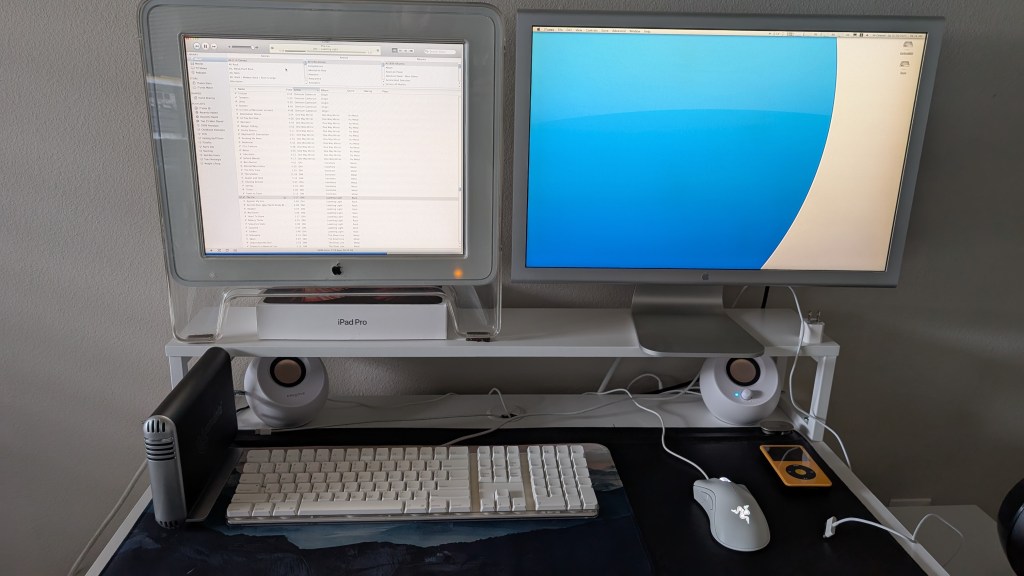
While I was at it, here’s a sneak preview of the other project I worked on over the past three months. I got my hands on this Power Mac G5 and made it just as useful today as it was back when it was a new system. I made a lot of upgrades to it, including a holy grail GPU for its time and the dual monitor setup pictured. I even upgraded the drive to an SSD and stuck the old one into a Firewire 400 enclosure. I hinted at how this sort of thing was a rabbit hole, and this is how far I’ve gone.

With that said, I have my organized music collection here as well. It’s extremely useful, and in fact, I started to use it in place of my second brain when it comes to drafting posts for this site. It’s far less distracting while still letting me do what I want, and there’s an understated elegance about legacy, PPC versions of OS X.
I will write more about the setup in a future post as well, but I decided to give iTunes a fair shake on this system’s installation of Sorbet Leopard.

If I had to be perfectly honest, I actually like to listen to music on my two-decade old Power Mac G5 more than I do on my daily driver Arch Linux system with the aforementioned ncmpcpp setup. I worked quite hard on my setup during the summer, and I’m glad I have it running the way I like it now.
Aside from that, I’m still working on a few other ways to continue enjoying my offline music collection. Specifically, I mentioned a while back that I never owned an iPod back in its heyday, instead opting for a Creative Zen Vision: M that I don’t even own anymore.
However, that finally changed. I ordered a modded iPod with several aftermarket features pre-installed, including bluetooth support, increased storage, a bigger battery, and a customized case color.
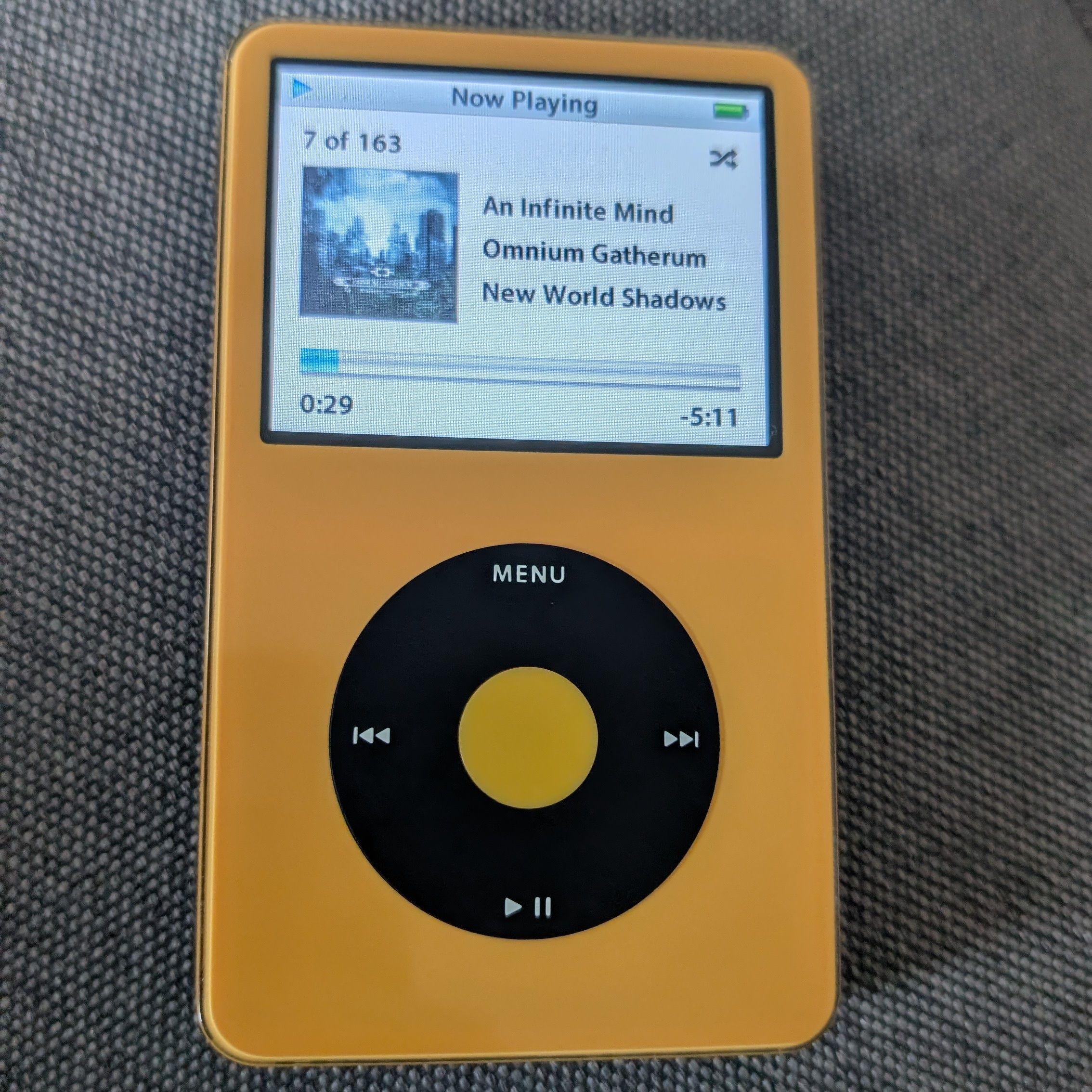
Those upgrades didn’t come cheap, and I had to wait at least a month for the company I ordered from to assemble and ship it to me, but it’s finally here in my hands. While this might seem redundant with everything I’m doing, this serves a few more purposes for me:
- I have another possible way to enjoy my music if something goes wrong with my Jellyfin server (I’m still barely a sysadmin).
- The headphone jack it comes with lets me listen within my car in a snap.
- I can sync it easily with my Power Mac G5 using iTunes.

As for the extra features, I do notice how nice the battery life is, I love how the storage is more than I’ll ever need for my music collection, I adore the housing (yellow is my favorite color), and the bluetooth works mostly perfectly. The only hiccup I’ve had was pairing the headphones (pictured above) with it, although maybe it’s a skill issue. While the pairing feature on the iPod works fine, there isn’t an easy way to only pair it with one speaker or set of headphones with a GUI, so it felt like I was trying to pair the headphones repeatedly until it finally worked by chance at some point. Still, I’m sure I just had to “get good” at this.
Other Advantages

I’ve heard the recent news about how Spotify started to require age verification for explicit tracks, and while I wasn’t worried about TIDAL doing the same thing, maybe this whole debacle is a good wake up call for me to start appreciating the music I actually have control over, the tracks and albums I simply had sitting in on my hard drive for several years.
On top of that, I didn’t really worry about it so much with Spotify or TIDAL, but I don’t have to worry about algorithms or bad recommendations anymore. If I’m listening on the iPod, I only listen to what I want and when I want it. If I’m streaming from Jellyfin, the only recommendations that pop up are the artists and songs I already have on my server.
I also don’t have to worry about blocking artists I don’t like anymore! Spotify did an okay job letting me block artists I didn’t like from ever being playable when I last used it, but TIDAL would still put said artists in my generated or recommended playlists if I ever ventured into those.
Speaking of artists, having my entire music collection visible to me without simply a series of curated playlists once again gives me a good bird’s eye view of my music. Since setting up Jellyfin and getting my iPod, it feels almost as if I’ve rediscovered music I hadn’t really appreciated in months or years. Yes, despite how many people complain about how Spotify handles music and ruins people’s playlists by over-commercializing with the most popular or “hip” tracks, I didn’t really experience that on Spotify. Instead, my actual issue was that I would stick to a few playlists with little incentive to hear some older ones. With this music library setup, I have more incentive to feel like I’m rediscovering long-dormant parts of my library.
The Disadvantages

In the interest of being honest, and this whole endeavor is really cool and everything, I still have some disadvantages to my setup.
Again, I hinted at this a good while back with my streaming service comparison, but the time it takes to make sure everything is properly tagged is still immense. In fact, I would venture to say it was easily the biggest disadvantage I could think of in terms of managing my own music library.
I mention this because that didn’t change at all. In fact, I spent a good weekend for hours on end trying to get everything tagged just the way I like it. Even after all of that effort, I still didn’t get my genres perfectly set up, and I’m not even going to bother with the ratings on iTunes.
Another disadvantage dealt solely with the iPod itself instead of the Jellyfin setup. Jellyfin plays any format I throw at it a-okay, whether it’s MP3, FLAC, AAC, or ALAC. I can’t say the same about the iPod. Unless I felt venturous enough to get Rockbox installed on it (which I have little interest in doing), I had to convert all of my FLAC music into ALAC while re-ripping a lot of my CDs to the latter format for compatibility.

But speaking of the iPod, I bought a lot of music to get my music collection up to snuff with what I enjoyed on Spotify and TIDAL. It cost quite a bit of money and time, sure. I did have some spare money lying around, and I would say it was well worth the price, although I did notice how much time and money went into this. Still, considering the alternative was to keep paying a subscription that accumulates over time and still results in me ultimately owning nothing, I’d say it’s worth the hassle.
Still, what I did find annoying was that initial sync with the iPod and iTunes. It took over four hours to get my iTunes collection synced over, although having playlist support through iTunes was quite nice. I know this might seem obvious to anybody around my age group who used an iPod all the time back in high school, but I like making playlists on iTunes and having them sync automatically to the iPod with no additional effort. Regardless, after going on my spending spree trying to get more music, I still had the extra step of trying to have both Jellyfin and my iPod on even ground. If I add something else to my iPod, I end up wanting to have it on my Jellyfin server too, and that’s just extra work overall, especially considering that I sometimes convert FLAC to something my iPod can actually play.
Additionally, I still have my Arch Linux machine running ncmpcpp, so that’s a third platform that I use to make my music redundant. While having copies of my music in multiple places can at least give me some place of mind, it’s yet another place I have to worry about having the same music collection all synced up. This is one of those places where streaming truly is convenient, as you only have to have everything tagged and set up once to have everything the same on all of your devices.
But speaking of Jellyfin in this case, I haven’t had the easiest time with playlists and syncing. ITunes is easy to make playlists with, but I really wish I could say the same about Jellyfin. The UI, while customizable, is rather cumbersome compared to the likes of Spotify, TIDAL, or any other more polished streaming service. In fact, that was why I bothered installing Finamp in the first place, to get the playlist building features that wouldn’t feel so clunky and time-consuming. However, despite my initial praise of it, Finamp still isn’t perfect either, and I’ve still yet to determine if I could simply export my iTunes playlists to Jellyfin.
I’ll update on that when I confirm if playlist transferring works seamlessly as expected, although I have already taken such a long time to finish writing and documenting this entire project as it is, and I would rather release it now than never.
Would I Consider Switching Back to Streaming?

Honestly, it’s a reasonable question to ask now that I’m where I am. I bought a customized iPod with expanded storage, and I set up a Jellyfin server to substitute not only TIDAL or Spotify, but Netflix on top of that. With all of this within my grasp, would I ever think of switching back to the way things were, when I paid my subscription to stream nearly whatever I wanted?
In short, no.
I put so much time and effort into this personal project to ensure I have more control of my listening experience. Despite how much I’ve had to do, I would say it was worth the trouble. I had been thinking more over the past several months over how I generally have little control of my music when I’m subscribed to a proprietary streaming service, and this has given me the impetus, the drive, to actually do something about it. The biggest advantage I can think of is that I don’t have to worry about licensing anymore. If I want to listen to music I have in my collection, I simply play it now. That’s it. I don’t have to be disappointed that the album is only available on Spotify instead of TIDAL or vice versa. I don’t have to be upset for the most part that my library isn’t available in one capacity or another. I don’t need worry about restrictive APIs when I can simply listen to my music on my desktop using ncmpcpp using a sleek terminal interface.
Plus, since I started doing this, I’ve found myself rediscovering so many old favorites in my library through iTunes as I tried to recreate new playlists from memory and scratch. There truly is something to be said about hearing a song that I hadn’t thought about in years and almost feeling like it sounded like the first time I heard it again. I rarely, if ever, had that feeling from any paid streaming service, regardless of whether it was Spotify, TIDAL, Deezer, or anything else.
Still Jamming Out

If you read this far, did this make you think about how you listen to your music? Would you actually consider canceling your music streaming service to gain more control of what you listen to? Otherwise, would you not be willing to do so? Why or why not? What’s your reasoning for choosing what method you listen to your music and how?
Additionally, for the homelabbers out there, what do you think I should do to improve my server setup?
Feel free to chime in down in the comments below; I’m genuinely interested in knowing your perspective.
Credit for prohibition symbol used in featured image goes to Timplaru Emil via Vecteezy.com
 Sudo Science
2 responses to “Dumping Spotify and Paid Music Streaming For My Offline Music Collection”
[…] Dumping Spotify and Paid Music Streaming For My Offline Music Collection […]
LikeLike
[…] been a rather busy bee this past month and a half. I already alluded to the fact a while back, but I recently got Jellyfin running on an otherwise neglected Mac mini. I was able to set up a […]
LikeLike