
I am still a Linux user first and foremost, but I have most definitely ventured further and further down the rabbit hole of tinkering with vintage Apple computers.
For those who have followed me long enough, you may know that I primarily grew up running Windows. I’d even say that’s part of why Windows XP is and always will be my favorite version of Windows of all time. I only actually started to become a Linux user for the first time in 2008, when I started college, and I got to try Ubuntu 8.04 Hardy Heron for the first time.
It was only several years after that I first used an Apple system outside of school. To make a long story short:
- Mr. Hyde back in the early 2010s really wanted to buy a good “ultrabook.”
- Said “ultrabooks,” running Windows, were outrageously overpriced.
- They were so expensive that Mr. Hyde thought to himself if an Apple equivalent would actually be cheaper.
- After a quick search, Mr. Hyde discovered this was true! The MacBook Air was several hundreds of dollars cheaper than a premium Windows ultrabook.
- Mr. Hyde bought his first ever MacBook Air from an eBay seller.
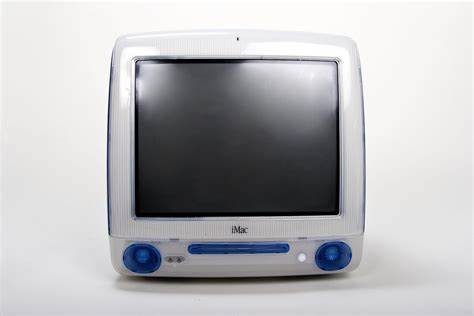
But speaking of school, I do recall an old memory of mine from middle school. My school, at that time, exclusively ran Apple systems throughout the classrooms, computer labs, and library. Our then-modern systems were iMac G3 systems, all indigo-colored, complete with the awful “puck mice” and good enough keyboards.

Humorously enough, our computer lab was home to all-in-one beige box Macs (I wish I could remember what specific Macintosh computers these were, but I don’t). These yellowed computers ran versions of Mac OS that felt archaic even at that time over 20 years ago, and it was all so we could run a monochromatic typing instruction program. If we finished our typing drills in class, we were free to play a shareware knockoff of Pac Man, which was in color. (On another note, I wish I could remember what the name of this Pac Man imitator was.)
The reason I went on this minor, middle-school related tangent connects to a memory I had of 8th grade, where my history teacher was hyped that the school replaced his computer with a then-new iMac G4. The monitor being built-in and mounted on a swivel seemed so novel, so futuristic at the time, but I recalled the keyboard that the computer came with it as well.

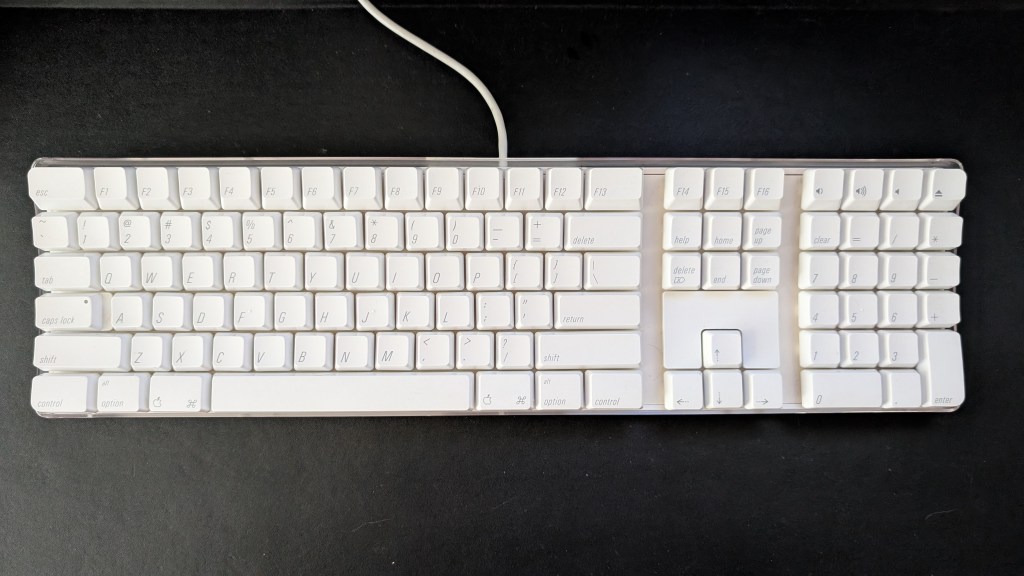
Many people know this as the Apple A1048 keyboard. It left a good impression on me, even as somebody who didn’t really care about Apple. Additionally, I eventually learned, there are people who still love and use this keyboard as a daily driver decades later.
When the YouTube algorithm recommended this video to me at seemingly random a year ago, I was surprised. Not only did somebody else remember this keyboard in a positive way, but was actively still cleaning it and using it regularly today.
That’s when I thought about it. Not counting the keyboards Apple puts into their laptops, their current offerings really aren’t anything special. While some may disagree, chiclet-style keys are hardly exciting.
Before anyone says it, I am fully aware that the A1048 is a plain membrane keyboard, not mechanical. Still, it’s more about the function of the A1048 itself that makes it stand out.
- The white aesthetic lends itself to matching with 2000s Apple systems or simply with all white accessories if you choose.
- The modified layout gives you everything you would need on a Mac system and then some, including dedicated volume keys and a CD eject key.
- The keyboard is easy to clean and maintain while still not looking hopelessly like a product of its time.
- The built-in USB port is immensely useful. Even now, it’s still excellent at plugging in flash drives or accessories.

But what about drawbacks? Considering this type of plastic and material, I’m pretty sure these keyboards are prone to yellowing over time if they are left exposed in poor conditions. That’s why people who find particularly yellow ones tend to pop the keys out and retro bright them. Thankfully, I didn’t have to do this; my keyboard was and still is perfectly white for now.
Aside from that, the only other thing I don’t like is how short the USB cable is, although I’m 90% sure it’s because Apple intended for them to be plugged not too far away, like into the iMac G4 base or a USB hub in an Apple Cinema Display on something like a Power Mac.
In short, I went out of my way to buy this board at a reasonable price for a project I’m working on (more on that in a future post). After getting it, I had to say I was still impressed with it today, and that’s coming from someone who loves using various Topre keyboards.
That said, I looked into cleaning it up and “modding” it to type a little more smoothly.
I’ve been looking for more excuses to type on it ever since I cleaned it up and lubed the sliders. To any readers thinking of lubing the sliders, I recommend using just a little lubricant to get a crisp typing experience. Too much results in the switches feeling a little too spongy and muffled. You can always wipe excess off with a paper towel to make the experience a bit smoother.
Another tip for anyone willing to try this: I recommend lubing all of the keys except the ones you hardly ever press. This way, you can see and feel a before and after, a direct comparison of how the lube has improved the experience. In my case, I left almost all of my function keys (F1 to F12, specifically) unlubricated.
Overall, I have been extremely satisfied with this A1048 keyboard after giving it a good cleaning and lubricating the sliders. Sometimes, as tech around us continues to rapidly evolve, the devices and systems we had a few decades ago will still be perfectly capable even in today’s technology landscape.
Have you ever used the A1048 keyboard from Apple? Did any other commonplace keyboard around the 2000s make you feel nostalgic? (I’m sure a handful of readers are thinking of a specific Dell keyboard we’ve all seen at least once.) Is there any other form of tech that just continues to work perfectly for you years and years later? It could be something like an MP3 player, a typewriter, almost anything. Feel free to comment below. I’d love to know what you think.
 Sudo Science
One response to “A Brief Tribute to the Apple A1048 Keyboard”
[…] je bij de eerste PC’s kreeg en de geweldige Apple keyboards van de jaren 90 en 00 waarvan de Apple A1048 mijn absolute favoriet was. De keyboards die je nu van Apple kan kopen vind ik hopeloos. Buiten dat […]
LikeLike