
UPDATE: As much as I liked using Omnivore, this page didn’t age too well. As of November 2024, Omnivore is shutting down, which will prompt me to continue my search for an alternative.
Switching jobs sometimes requires moving out of where you live, further than you expected. Moving can also be expensive, expensive enough to warrant canceling unused or underused services and subscriptions. After having canceled Spotify in favor of TIDAL for now (Spotify is hiking prices as of late, after all), I decided to venture further with my cost-cutting measures, especially since my planned vacation with my girlfriend is now over and our moving costs are now piling up.
I’ve canceled a few services, and I’m strongly considering switching phone carriers to keep saving my hard-earned cash, but one service I was more than happy to cancel was Matter, a read-it-later app that I wanted to like, but found myself not using for several reasons. It’s not that the app is designed poorly as a whole or anything, but I did have a few gripes with it:
- Matter’s sign-in with email links feels clunky at times, especially if all I want to do is enter in a username/email and password combo.
- It still doesn’t have an Android app. They’ve promised one “coming soon” for ages, but I’ve seen no signs of it. I’ve searched for their app just now on Google Play just in case they released one quietly without me knowing.
- It’s going to cost you, especially if you want to use some basic features that really should be free. While I get some features would ideally need money to fund, some things such as “personalize Matter” (e.g. changing the basic color scheme) will cost you each month.
To be as fair as I can, I did read their funding page to get an idea why they charge at all. They have a belief and a vision for their product, and people who pay are seen as supporters, patrons fostering the service for the long haul. I suppose I can respect them for that.
Regardless of these other issues, it does do its job well enough. It does save pages to read later, it does let you highlight and annotate them, and it does let you sync what you have to other apps of choice. I was originally going to complain that there was no way to sync it to Obsidian, but that changed in the last year or so when they finally released their official plugin to use the service, so good on them for addressing that. Unfortunately, I wasn’t using the service enough because of its lack of Android support and email sign-in shenanigans, but I am moving very soon, and moving is still not cheap.
Of course, I still had a handful of articles saved on there, and I did recognize the utility of using an app like it. Instead of dumping the idea of a read-it-later app entirely, I found it prudent to look into alternatives.
The Search for Alternative Read-It-Later Apps

The obvious one many a Firefox user is familiar with is Pocket, but… eww. Don’t get me wrong, I did use Pocket eons ago around the same time I was using Evernote (I really didn’t know any better), and it worked just fine when I last did, but Firefox integrating it directly into the browser soured my impressions of it soon after. Other than that, there are no highlighting and annotating features immediately available (they promise “unlimited” highlights with premium plans), so my search continued.

Another big one is Readwise, although this is where I feel bad about not owning a Kindle (I’ve been using a NOOK since 2010), as it supports synchronizing highlights from Kindle books to your account, which sounds like a boon for a second brain user such as myself. Aside from that, even if I were to use it, I wouldn’t help but have that nagging feeling I’m missing out on one of the service’s best features. Considering it costs money, something about not having the ability to use every feature without having to invest money and time into a different device altogether rubs me the wrong way. It’s one thing if the app is free, but this would just make me feel as if I’m paying money to not be able to use every feature.

Speaking of other alternatives, there was also the well-known Instapaper, a service I would hear about every so often, although it suffers from a 5-note monthly limit for free users. You can get more, but of course, it’s going to cost you as well. Again, it also supports Kindle sync, but as somebody without a Kindle, I didn’t need that.
With more searching, I thought I was done when I stumbled into Wallabag, which, if I had to recommend any from this shortlist of services I didn’t use, it would have to be this one. Unlike the other options on this list so far, this one is different in how it’s a FOSS application. It’s a self-hosted solution, but since I’d prefer to not have to do that when possible (paying for a couple of servers is enough already as it is), this is the only solution where I feel it makes the most sense to pay anything at all. If you’re like me and don’t want to self-host, you can pay €9 a year for their hosting. Considering that’s for a year and not a month, that’s a remarkably excellent value. Still, I don’t really want to pay right now, so my search went on.
I started to notice a pattern in a lot of Matter’s alternatives. Outside of the great choice of Wallabag, most of them had the same handful of serious drawbacks:
- Basic features that didn’t really have to cost anything were behind a paywall. I get charging for sync to other services, but charging to make X number of highlights or for basic UI customization is something I don’t like.
- Some apps supported sync with Kindle, which I didn’t have, so paying extra for a feature I wouldn’t be able to use didn’t feel right.
- In some options I haven’t described, such as Alfread, they primarily supported Apple’s ecosystem first and foremost. As a result, it didn’t matter how many features there were if I would be chained to using an iOS device to make the most of it. I already made this mistake with Scrivener.
I just needed an app that didn’t have these issues. In other words, I wanted a read-it-later app that had a reasonable number of free features, didn’t make me pay for features I wouldn’t be able to use, and weren’t confined to just Apple’s walled garden.
Enter Omnivore
Thankfully, after a bit more searching, I found exactly what I wanted. I discovered Omnivore and found that it met all of my needs.
- It’s FOSS just like the self-hosted Wallabag.
- No Kindle access to feel locked out of. Even if it were here, Omnivore is 100% free, so I don’t have that nagging feeling of paying for features I can’t use.
- It synchronizes with Obsidian and a few other second brain note-taking apps like Logseq and Notion.
- It allows you to import and sync from the aforementioned Pocket and Readwise.
- The basic appearance of the app can easily be changed without paying a single cent.
- Other features I didn’t know I would need that do seem genuinely useful instead of needlessly complicated, such as “Digest” to help you look again at your saved articles, or using an Omnivore email address to add newsletters.
- Easy access to API keys for services or apps that require them.
- Did I mention it’s free?
With little to actually lose, I signed up and gave it a spin for a while, putting the app through some paces. Now, a little over two weeks later, I’m quite pleased with how well it has performed.
Adding Feeds
As one would expect from a modern read-it-later app, Omnivore supports adding RSS feeds. While so many sites seem to be doing away with their RSS links being visible on their page, there are other ways to find them.
By doing this, you can easily access readings through feeds later and read when you want to. Additionally, you can click what interests you, start highlighting, make annotations, and add what you think would be most useful for your second brain.

Too Much To Read?
It’s an easy trap to fall into, where you add too many feeds and can’t possibly catch up with everything. That’s where Digest comes in.
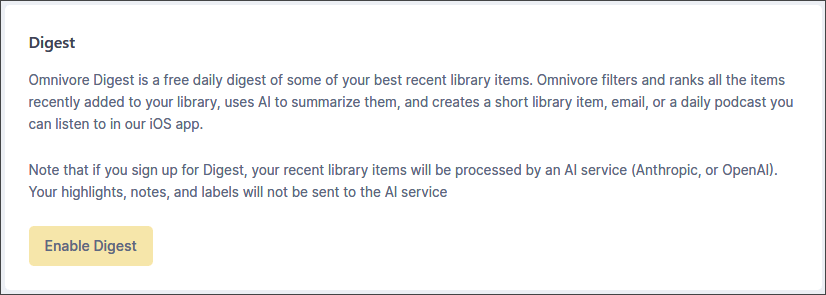
Digest is a feature that lets you curate what stands out from your library using AI. Additionally, you are given full control of how you want Omnivore Digest to deliver your content with your choice of library, email, or via the iOS app.
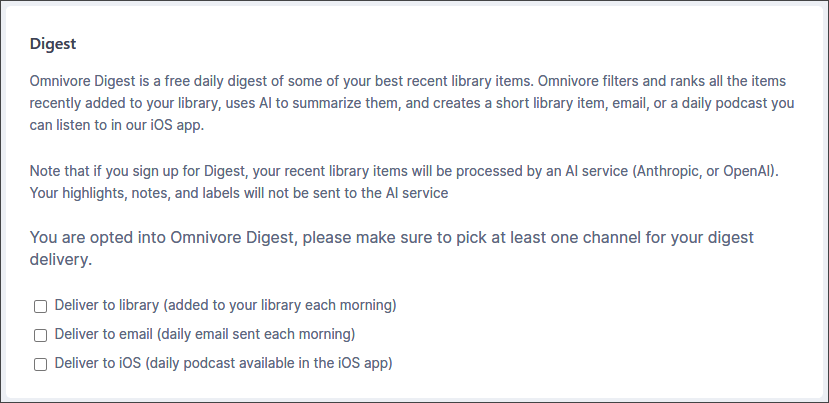
They don’t have an option to do this for the Android app (yet), but I’m not too critical on that because the Android app is currently in a pre-release stage, which is understandable. Besides that, it’s still a completely FOSS service, so they can take the time they need to perfect it. Despite only being in a preview state, the Android app still allows you to save any link and access your saved articles and notes seamlessly.
Other Ways to Add Content
Of course, you could be a bit more like me and use the browser extension. While I do like using feeds and everything to keep up with content, I find that adding feeds can quickly become chaotic, especially if you add three or more that regularly update. It becomes difficult to keep up with everything, and it becomes rather tempting to simply not read things as your feed clutters up, the same exact issue I’ve had whenever I try to go back to reading articles on my RSS feeds.
Consequently, I find Omnivore and read-it-later apps much more useful if I intentionally search for something I want to read in particular, then save it to the app. If you are unfamiliar with how this works, it’s quite simple:
- Install the browser extension for Chrome-based browsers or Firefox.
- Have the Omnivore button visible on your browser’s toolbar (optional).
- Find a page you want to save or read later.
- Save it to Omnivore by clicking the button on your toolbar.
Alternatively, if you don’t want to clutter your browser’s UI with an extra button, you could always right click on the page and select the option to save the page to your Omnivore account.
Upon saving an article, I’ll find it saved in my Inbox on Omnivore. Opening it there allows me to add highlights, annotations, and more. I set everything up to sync with Obsidian and I can then access whatever I highlighted or annotated there in a folder of my choosing, and I’m on my merry way!
Drawbacks to Omnivore?
It’s outrageously minor, but I do have the smallest of gripes with how everything works specifically with Obsidian’s Omnivore sync plugin. It boils down to two things, really.
- Highlight colors don’t synchronize from Omnivore to Obsidian. Rather, everything you highlight is treated equally.
- Omnivore in Obsidian only seems to synchronize on Obsidian’s startup. As much as I didn’t care for Matter, even that plugin synchronized at set intervals regularly within Obsidian.
I have workarounds to deal with this, although they aren’t the most convenient.

For anybody wondering how I highlight content on Omnivore, I built a system with the three of the four colors they support highlighting with:
- Yellow: For things I kind of already knew that are still worth remembering or reiterating.
- Blue: For things that I mostly didn’t know or realize.
- Green: For potential pitfalls or mistakes I don’t want to make.
I haven’t found a use for the reddish/pink highlight color yet, although if I come up with something, I’m updating my system.
Still, Obsidian shows everything by default in just a quoted format, so I have to install the Highlightr plugin from the community plugins. Afterward, I have to manually highlight everything in yellow, blue, or green from what I’ve synchronized. Upon feeling like I’ve sufficiently highlighted and annotated what I have, I’ll move the highlights and notes into a different Obsidian folder to analyze or work with later.
The reason I put everything into a separate folder within Obsidian deals with another shortcoming and subsequent workaround: the Omnivore plugin only syncs on launch when I open Obsidian. To get around this, I simply have to close and reopen Obsidian, except if I’m not careful, all of the highlight colors I added within Obsidian will be erased. That’s why I move things I care about into a separate folder within Obsidian, to avoid having everything overwritten by what’s on Omnivore by default.
But other than these things, it’s not the end of the world. I’ll still feel like I’ll have to look at the notes more than once anyway, which is part of the reason behind building a second brain in the first place. Only then will I be able to apply Tiago Forte’s methodology of PARA and CODE to make them more useful to myself anyway. What’s the point of saving something in your second brain if you have no intention of returning to it anyway?
What About the Email Login Thing?
Upon signing up, Omnivore initially suffered from the same flaw that Matter did, where I was only given the choice of signing in with an email link, which can be inconvenient. Matter also never offered any possible means of letting me sign in a different way. Why not use an email address and password like the vast majority of websites instead? It would be so much easier.

Omnivore figured out what Matter never could. I love this so much, and signing in with Omnivore on different devices is so much less of a pain.
My Wallet Feels Better Already!
I find this so much more useful because I can get back to syncing notes, saving annotations, and building a second brain that actually means something to me, something that I initially lost sight of at some point. I’m quite content with Omnivore right now and will continue using it to grow my second brain with meaningful information.
Do you use a read-it-later app or not? Have you considered it? Do you sync highlights or annotations at all? Do you find a read-it-later app can help with your second brain? Let me know in the comments. I’d love to know what you think.
 Sudo Science
2 responses to “Omnivore: A Read-It-Later App I Actually Want to Use”
[…] exorbitant that does the same like Dashlane, RoboForm, or 1Password. It’s also part of why I switched from Matter to Omnivore to save my hard-earned […]
LikeLike
[…] me explain: After trying to switch away from Omnivore (when I discovered it was shutting down), I was ready to transition to Raindrop.io as a […]
LikeLike