

(NOTE: Skip this top section and scroll down to “Just Give Me The Solution” if you just want the answer to fix this right away.)
I have another quick Linux tip here, and this one is about Krusader, the Qt5-based, double-pane file manager for Linux. If you just recently installed Krusader for the first time, you may notice that it doesn’t normally support image previews out of the box on non-KDE systems. In other words, clicking View > Show Previews on the menu bar doesn’t do anything on its own. Was I missing something in the menus or configuration? What was I doing wrong?

However, after MANY attempts to troubleshoot this, I finally figured out the solution was something relatively minor I had overlooked.
Just Give Me The Solution
HERE’S THE SHORT ANSWER: Install kio5-extras (Arch Linux) or kio-extras5 (openSUSE Tumbleweed) onto your system, restart Krusader, then make sure View > Show Previews is enabled.
The Explanation
I’m willing to admit that I was influenced by The Linux Cast to give Krusader a try.
Matt is so passionate about this app that he made a video declaring it was his favorite app on Linux. A few years after he published this video, it still appears in his dotfiles on Gitlab for his Hyprland setup.
Still, I passed over it initially because I couldn’t seem to get image previews to work at all. I searched online for solutions, although it seems that Krusader is not so popular compared to the many other file managers available on Linux. However, the few places I’ve seen discussing the broken previews in Krusader on a non-KDE system mentioned installing kio-extras to get them working. Matt also brings this matter up in the above video somewhere around the 11:12 mark.
For a while, this may have worked, as this video was uploaded two years ago, but with the more recent Plasma 6 release and upgrade, it seems that kio-extras only affects Qt6 applications. Consequently, installing kio-extras had no effect on the Qt5-based Krusader.
After enough digging, I realized that the Qt5-based package for kio-extras was separated into kio-5extras/kio-extras5. Again the package name will vary depending on the distro; I only have it shown here for Arch and Tumbleweed because those are the two distros I use daily.
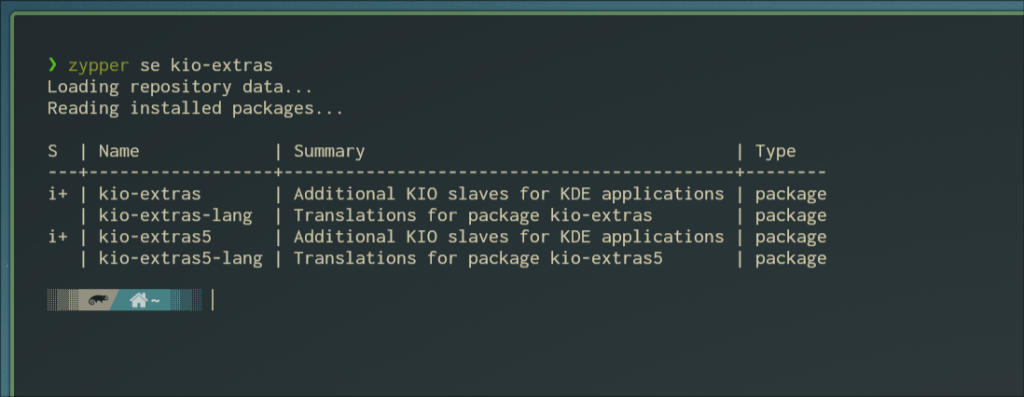
Thus, the solution is to explicitly install the kio-related package with “5” in its name. This should work so long as Krusader is Qt5-based. Upon installing the appropriate package, close any active instances of Krusader. Click View on the menu up top and make sure you have Show Previews toggled on. That’s it! Browse to a directory with images and watch those thumbnails load successfully!

Hope This Helped
Did you find this tip helpful at this time? Do you like using Krusader? If you’re reading this far enough in the future, is Krusader based on Qt6 by this point? Let me know in the comments. I’d love to know what you think.
 Sudo Science
4 responses to “Working Image Previews in Krusader on a non-KDE Desktop”
Hello, this is Matt from The Linux Cast. My image previews broke and searx brought me here. I didn’t think that the move to qt6 was the issue, but it is. So thanks for that. You have made Krusader great again!
Also, do you have an rss feed? I’d love to put your blog in Freshrss.
LikeLike
Hey, Matt!
It’s an honor to have you commenting on my site. I’m a fan of your channel myself, as you can probably tell. Anyway, I believe all you need to do to access the RSS feed for this site is to take the domain and add “feed” at the end, like so:
https://sudoscience.blog/feed
Let me know if that works!
LikeLike
Yup, that worked!
LikeLike
[…] know I wrote about Krusader a while back, but I found myself back to using Nemo as my file manager shortly afterward. When I first used […]
LikeLike