

I had an itch recently to listen to some podcasts again, something I haven’t done as often as I used to several years ago.
While I am aware that Spotify has some pretty nice podcast support, that’s mostly for the GUI app. Trying to listen to podcasts on spotify-player doesn’t really make sense for me in my case because it’s designed primarily for music, not podcasts. In fact, the last time I listened to a podcast a few months ago in my car on Spotify (via my Android phone and a headphone jack adapter), I opened spotify-player on my workstation and saw a blank album cover and blank title, which leads me to believe that there’s no real podcast support here.
I started to think about how I could start listening to podcasts and initially did a search for AppImages. After all, I only have a small handful of them, and I do like them enough. Might as well use a few more, right? My search led me straight to CPod, which I downloaded to my Applications folder, made executable (via chmod +x), and ran.
That’s when I was greeted by this:
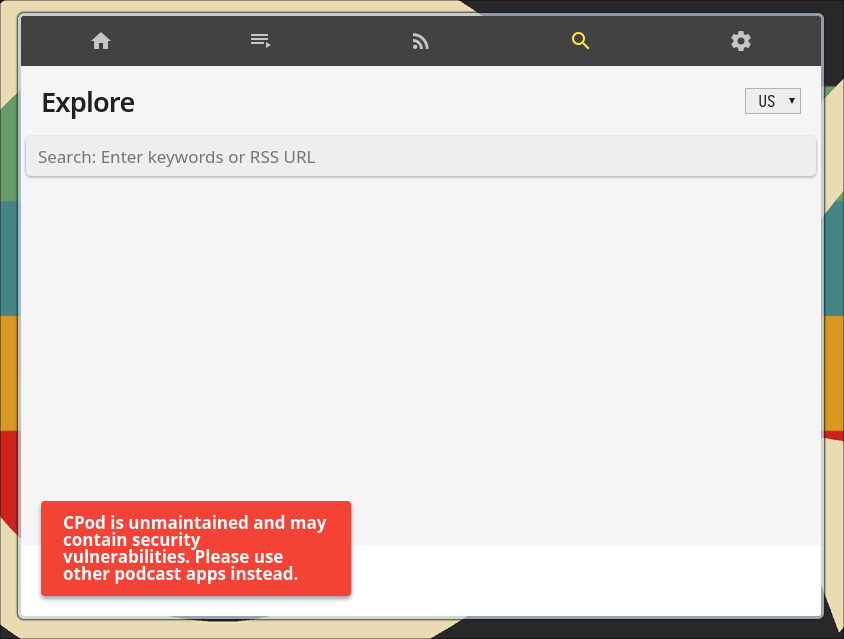
Seems I was so excited for a potential new podcast app to try out on my openSUSE system that I hadn’t noticed on the Github page the disclaimer that it was currently unmaintained. Heh heh, whoops.
That led me to a few more minutes of searching around, but I was only finding other GUI music players that had podcast functionality built in. While I had reconsidered the faint possibility of reinstalling Exaile, a nostalgic favorite of mine from back in my Ubuntu days, I didn’t want to install a music player when I didn’t really plan to use the music-playing aspect in the first place. However, I soon stumbled across something better for my needs.
Enter Castero

I already listen to my music with a CLI, so why not listen to my podcasts in the same way?
Better yet, Castero is much easier to use and set up than I expected, although that might be in part because I’m already somewhat used to using audio playback applications within my terminal at this point.
How to Install Castero?
Thankfully, I had few issues installing Castero, although you’ll have two options on how to get it up and running.
Unlike the previously-mentioned spotify-player and how that’s Rust-based, Castero is written in Python. That means you can choose to install it with pip. If this option sounds good to you and you already have pip set up, enter this into your terminal of choice:
pip3 install castero
If you’re on openSUSE like myself and have the externally-managed environment thing going on, just use pipx instead of pip3 for the above command.
Wait for it to install and you’re all set! Additionally, if you install Castero this way and need to update it to a newer release at some point in the future, just enter this command again with the upgrade flag:
pip3 install castero --upgrade
If you would rather install Castero manually, you’ll have to follow the instructions on the Castero Github page:
git clone https://github.com/xgi/castero.git
cd castero
sudo python setup.py install
And repeat whenever you want to upgrade to a newer release.
Using Castero
To run Castero, simply type castero into a terminal and see the interface appear.
Now you’ll need some feeds from podcasts to listen to. Search online for a few of your favorite podcasts and find their RSS feeds. With a URL copied, press a in Castero and paste when prompted.

Repeat this with all of the podcasts you want to add and you should be all set to start listening. Of course, you can explore the app’s commands with the h key like so:

One of the first things I would suggest after adding episodes is to try testing out the layouts with keys 1 through 5. See what layout works best for your needs; I’m personally a fan of layout 3.
Afterward, you can select an episode listed under a feed and hit Enter to start the episode. Press p to play and pause, f to seek forward by 30 seconds, b to seek backward 10 seconds, and so on.
Castero Configuration
Be sure to run Castero at least once to have the app automatically generate a config file for you. Once you do, you can open it in its default location with your text editor of choice. If I wanted to use Vim to open it, I’d enter this into the terminal:
vim .config/castero/castero.conf
Of course, you can always use Nano or whatever other text editor you like to open this file in this directory.
From here, you’ll want to read the comments in the default file and see what you’ll want to comment, change, and so on. Personally, I had to change color_background from black to transparent in order to make the app look much nicer, but that’s just me, and that’s the only change I made.
[colors]
# Available colors for all fields are:
# black, blue, cyan, green, magenta, red, white, yellow, transparent (background),
# integer from -1 to 255 if terminal supports 256 colors
# NOTE:  Background transparency only works on compatible terminals with compositing

# The foreground (text) color of the main interface.
# default: yellow
color_foreground = yellow

# The background color of the main interface.
# default: black
color_background = transparent
If I had to make any suggestions, I would set the number of seconds you want Castero to seek forward and back, but the default 30 seconds forward and 10 seconds back is already ideal for my needs.
Now We’re Listening in Style
I’ve only been using Castero for a short while, but I’m already immensely satisfied with it. It’s reasonably lightweight, does one job, and does it exceptionally well. What more could I really ask for from a podcast app? Well, if I only had one complaint, it’s that Castero takes a bit of time to start up for me, although I’m not sure if that’s because of how I have my openSUSE system configured. YMMV when it comes to speed.
Have you used Castero yourself? What did you think of it? Do you use another podcast app or means of listening to podcasts? Feel free to share what you have to say. I’d love to know.
 Sudo Science
One response to “Play Podcasts in the Terminal with Castero”
Good post.I subscribed. Have a happy weekend🍀☘️💝
LikeLike