

I Just Want to Fix This Problem!
This is part of my “Quick Tips” for Linux; you’ll want to skip this starting section and go straight down to “Just Give Me The Steps!” if you’re in the same boat I was. Otherwise, if you want to see if your situation regarding swap partitions is similar to mine, keep reading this section to see if the fix I found might work for you.
I’ve been immensely satisfied with openSUSE Tumbleweed after completing my 30-day challenge with it on my workstation successfully. However, I installed it and dual booted with a drive I share with Fedora. Originally thinking I would want to just go back to Fedora, I only partitioned a bit of free space compared to the rest of the storage on my NVME drive dedicated to Fedora.
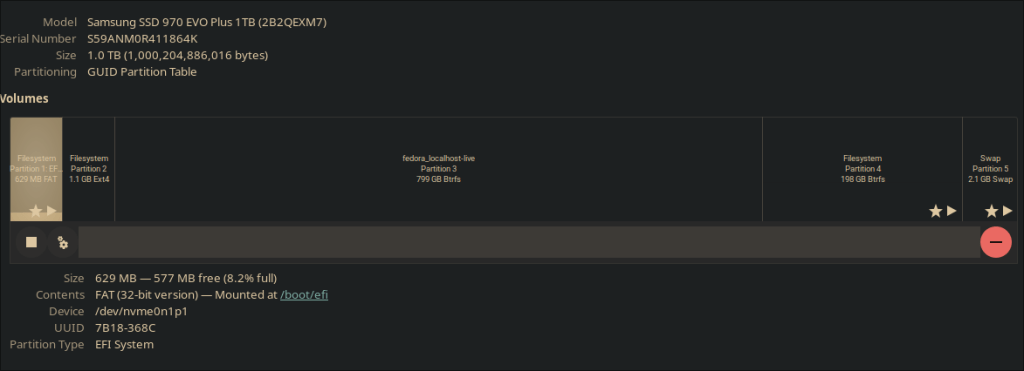
I struggled for a bit to figure out how I was going to cut off another chunk of free space, move the openSUSE partition to the left, and extend the openSUSE partition into the free space. Makes sense, right?
It was a lot harder to actually do.
I tried using gParted because the thought of messing up only to find my system unbootable made me queasy. Upon launchilng gParted, I tried moving the partition and extending, but I always got some sort of error and it would never succeed. I even tried booting into a live Ubuntu environment to see if the drives being mounted had something to do with it, but no dice.
That’s when I made a critical mistake: I deleted the swap partition to see if that made any difference.
Spoiler: It made zero difference entirely, so I had to manually create another swap partition. I made my new one, right clicked it, and selected “swapon” to toggle it. Should’ve been that simple, right?
Everything should have been back to the way it was, but then I noticed something was wrong: openSUSE was now taking almost 2 minutes to boot up.
I tried troubleshooting and hopefully diagnosing what had happened, as I did run an update just before attempting my partitioning plan. Maybe my kernel had messed something up? Rolling back to a previous snapshot made no difference, so that wasn’t the case. My boot times were still unbearably long, and troubleshooting this was trying my patience. It wasn’t fun to change something and reboot only to see it take another three minutes and reconfirm how nothing was working.
I gave systemd-analyze a shot, but didn’t really see much of a smoking gun besides userspace taking significantly longer. But what exactly was causing that in the first place? A cursory glance at systemd-analyze blame and systemd-analyze critical-chain gave me a few breadcrumbs, but searching online always led me on a wild goose chase. Nothing was specific and definitive enough in these results, as far as I could tell.
Eventually (and by that, I mean a few days later), I figured out my swap file really was to blame.
What Was Wrong (And the Fix)
At some point before realizing it, I thought that maybe the swap file really did have something to do with the slower boot times, as I would check in gParted to see the option to “swapon” instead of off. I thought I had toggled it on, but upon another slow reboot, I saw the option to “swapon” in gParted again as if nothing had happened. Was my swap partition working? Why didn’t it stay on?
That’s when I ran blkid to see what was going on.
Upon running the result and cross referencing it with the result of cat /etc/fstab, I realized that the UUID for my swap on both commands did not match.
I decided it was worth looking into this, as it did coincide with when I started having the problems. Plus, I was out of other options. I copied the UUID I got from the blkid result and used sudo vim /etc/fstab to find the line where I had my swap partition. I erased the old UUID in the file, pasted the one I got from blkid, saved, and rebooted.
It worked! Changing the UUID in /etc/fstab to have the UUID from blkid fixed everything, and my boot times were back to what I expected.

/etc/fstab after updating with the current UUID. I also know my loader takes a while, as I did daisy chain rEFInd with the openSUSE bootloader.Just Give Me The Steps!
- Step 1: Run
blkidand find the UUID of your swap file. - Step 2: Cross reference it with what you have in
/etc/fstab. - Step 3: Make sure the UUID for your swap partition in
/etc/fstabmatches what you got withblkid. Edit the file if they do not. - Step 4: Save any changes you make and reboot to see if your boot times are faster now.
What About Fedora?
Honestly, I’m so happy with openSUSE that I saw little reason to keep Fedora on this drive. That’s why I erased Fedora and, eventually, made openSUSE the default OS on my workstation. Not having to use rEFInd also served to shorten my boot time as well.
Did you stumble across this because you had the same issue I had? Did you manage to fix the problem with this series of steps? Let me know in the comments. I’d love to see what you have to say.
 Sudo Science