

This is part of my quick tips for Linux. If you want the answer right away, feel free to scroll straight down to the section titled “Give Me The Quick Solution.” I won’t judge.
I’ve been using Awesome WM for almost two years now. Despite my attempt to jump to a mix of XFCE and i3 combined together, I found myself missing the comfort and familiarity of Awesome WM as a whole.
Still, there was one not-so-Awesome problem: I couldn’t get gnome-polkit to work correctly within Awesome WM. Whether it was on my Arch system or here on my Fedora laptop as I type this, I didn’t know what to do to make it work correctly.
Until recently, that is!
What’s So Important About polkit-gnome?
Sometimes, I need to launch apps or programs that require root or sudo privileges. It’s easy to take this for granted on a full desktop environment, as everything is already taken care of on that front, but if you’re in a window manager, you need this working correctly to run elevated permissions on apps.
For instance, the backup app timeshift needs elevated permissions to open. If everything is working fine when I launch it, I should see this prompt pop up:
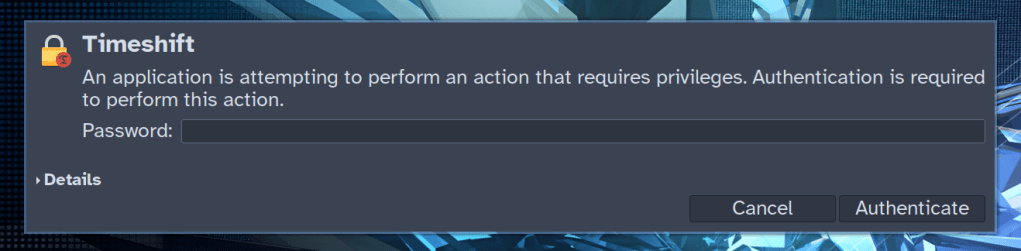
gnome-polkit‘s very own prompt. You should see this pop up if you’re running an app that needs elevated permissions.But if polkit-gnome isn’t working right, more than likely you’ll see nothing happen when launching something like Timeshift. It’ll almost be like you did nothing at all.
I Couldn’t Get It Working
For a long time, I kept looking it up and never getting it right. It got to the point where I simply gave up and either resorted to running said apps from a terminal with sudo (not the best idea) or logged into a dedicated desktop environment from time to time just to run these programs.
Either of these workarounds aren’t ideal, so what do we do to fix this? What can we do to easily run elevated permissions apps from a WM?
I kept searching around and finding dead ends. Sure, I resorted to adding a terminal command to my autostart:
# (NOT WORKING) autostart command for polkit-gnome on Awesome WM and Fedora
/usr/libexec/polkit-gnome-authentication-agent-1 &

# Same (NOT WORKING) polkit-gnome command for Awesome WM on Arch Linux instead
/usr/lib/polkit-gnome/polkit-gnome-authentication-agent-1 &
But it was like doing nothing at all on both systems. So many websites said I had to invoke this command, but I didn’t really get results. What was I doing wrong?
I’m also pretty embarrassed that it took me this long to finally solve this problem, but hey, better late than never!
What Did I Finally Do To Fix It?
I did a lot of troubleshooting. I kept reinstalling polkit-gnome, I kept going through the Arch Wiki in hopes of finding something remotely relevant to my issue, and I kept looking into it through online searches, but there was never any result that got it working.
Only then did I realize it was all a PEBKAC mistake on my part. I just needed to make one minor change to get everything working: delete the ampersands (the & symbols) at the end of the commands.
I was stunned that the solution was this simple; I was more astonished that I hadn’t tried it sooner. The issue really was my fault, but my embarrassment soon gave way to how elated I was that I could actually run Timeshift so smoothly now. No more questionable or inefficient workarounds!
So of course, verify that the directory on your system does exist and leads to the file for polkit-gnome-authentication-agent-1. You need to make sure the directory exists by using the ls command from your terminal or simply browsing there with your preferred file explorer. If the directory path is wrong, the window manager will run an invalid autostart command because the directory leads nowhere.
Once you’ve verified it, simply copy and add the directory path to your autostart in your window manager, but don’t add the & at the end of the command this time.
# Both of these commands worked for me!

# Awesome WM and Fedora

/usr/libexec/polkit-gnome-authentication-agent-1

# Awesome WM and Arch Linux

/usr/lib/polkit-gnome/polkit-gnome-authentication-agent-1

# Ubuntu/Debian users will need to check directories on their own, but it may be different from the two listed above.
Since this is for Awesome WM, there are different ways to implement this. The simplest way would be editing your .config/awesome/rc.lua file.
# Simplest way to start polkit on Arch
# Replace code within quotation marks with the libexec directory for use on Fedora

awful.spawn.with_shell("/usr/lib/polkit-gnome/polkit-gnome-authentication-agent-1")
Or if you’re a bit more like me and have a more efficient autorun setup:
# My current autorun setup in Awesome WM on Arch
# Change any of the parts in quotations to commands, directories, aliases, or programs you want to run on startup with Awesome WM

autorun = true
autorunApps =
{
  "sleep 1 && nitrogen --restore",
  "/usr/lib/polkit-gnome/polkit-gnome-authentication-agent-1",
  "redshift",
  "nextcloud",
  "picom",
  "nm-applet",
  "xfce4-power-manager",
  "xset s off -dpms",
  "input-leap",
}
if autorun then
  for app = 1, #autorunApps do
    awful.util.spawn(autorunApps[app])
  end
Reload your WM and try launching something that normally requires root permissions like Timeshift. You should now see the prompt asking for your password. Enter it in and the program should successfully start for you now!
Give Me The Quick Solution
The quick solution is to run the polkit from the directory without ending the command with a “&” like many examples and dotfiles I had seen do.
It’s Still Not Working For Me?
I’ve noticed gnome-polkit may be dependent on having GNOME installed. I don’t mind having it on my Fedora system, so it makes the most sense for me to use it because it’s already there. That said, if somebody is running it without GNOME installed, I could see that as a possible (?) reason it doesn’t work. The reason I’m not entirely sure is because I recently installed XFCE on my Fedora system (alongside GNOME) and used it with i3 for a short while, but I noticed that it was using gnome-polkit despite the existence of XFCE’s own polkit, which wasn’t installed.
Regardless, the solution in that case would be to try other polkits for different desktop environments. Search your package manager for the polkit packages used in LXDE (I noticed this one is particularly popular with WM users), MATE, XFCE, or KDE if you like. Once you have one installed, verify if the directory is valid and set it up in your autostart. Reload and try again.
Did this help you with running elevated programs in Linux from a window manager? Which polkit do you prefer? Which WM do you use? Just for fun: what distro are you running?
 Sudo Science