
It was around mid-2017 when I finally considered switching away from QWERTY. I was a rather accomplished typist who could push 95 to 100 WPM on most days, but I felt I could do more when it came to overall typing efficiency and ergonomics.
Emphasis on ergonomics. My wrists would suffer from carpal tunnel when I wanted to type for longer periods, and I had enough. I didn’t want to shill out a ton of money for an ergo keyboard, so I decided trying another layout would be a great idea.
That’s when I began to dabble in a handful of keyboard layouts to see what suited me. I thought there was a very real risk that I would be wasting my time and eventually come crawling back to QWERTY’s inefficient familiarity sooner or later.
It’s 2023 as I type this and I haven’t touched QWERTY since (aside from using the computer of a colleague or friend every now and then). I can’t imagine ever going back.
What Exactly is QWERTY?
In case you’re unfamiliar, look at the top row of letters on your keyboard. You’ll see the Q key, followed by W, then E, and so on. These first six keys spell out QWERTY, hence the QWERTY layout.
It’s so easy to take for granted that this layout doesn’t seem to make the most intuitive sense. It’s just like wondering why The Simpsons have yellow skin; we became so used to it that we just stopped questioning it. But aside that point, it’s easy to question why our layout doesn’t go in alphabetical order. Why is that?
The QWERTY layout became ubiquitous thanks to the era of typewriters. It was said that the layout was intended to prevent jamming on the mechanical “hammers” getting tangled with one another as they pressed the paper. It also explains the staggered nature of the keyboard’s design (as opposed to having all the keys in perfect vertical rows like on ortholinear keyboards). However, I’ve read conflicting reports on how this layout was purposely designed to slow down typists in order to keep the typewriters working more efficiently.
Another conflicting report I read up was how the layout was designed so salesmen could hunt and peck the word “TYPEWRITER” on the top row with just an index finger. This way, they could demonstrate to prospective buyers. Again, I’m not sure if this was done on purpose or if the top row contains the letters to “TYPEWRITER” by sheer coincidence.
Regardless, QWERTY stuck around as the standard, although there was an attempt back in the 1930s by one August Dvorak to create an alternative layout that was said to solve QWERTY’s shortcomings. Unfortunately, QWERTY was already everywhere, so it didn’t gain traction despite being noticeably superior.
Computers eventually made their way into people’s homes, and the very same QWERTY layout made the jump. It seemed as though computers were going to take the place that typewriters once held; people who were proficient at using typewriters could, ideally, move their skills over to a word processor without missing a beat.
Despite the fact that computers don’t jam the same way typewriters do, it seemed that QWERTY was going to remain entrenched in computing. But just as Dvorak always had its stalwarts, people began to notice QWERTY’s shortcomings, so a demand (a small one, but a demand nonetheless) for a more efficient alternative developed.
What Else Is There Other Than QWERTY?
There are many layouts available to try in case you really want to get away from QWERTY’s inefficiency. Many of them offer notable advantages over QWERTY in their own ways. I’ll be looking at them in the order I tried them when I decided I had enough of QWERTY.
Dvorak
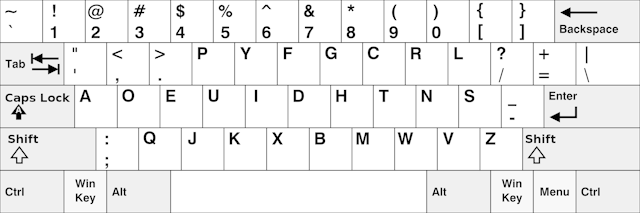
The aforementioned August Dvorak created his own layout, which he named after himself. A major advantage of Dvorak is how all of the vowels are accessible on the home row from the left hand. In English typing, this gives an alternating effect with most of the consonants clustered to the right hand.
This was also the first keyboard layout I tried to switch to! While I did like the alternating effect as I tried to get started, it just wasn’t for me. I thought too many of the keys were needlessly moved around (notably the punctuation symbols, although I can see why some are in the top left), so it felt like the learning curve was more than I bargained for. There’s also the “L” key in the top right corner that I would have to reach with my pinky, which I really didn’t like. Something else I didn’t like was how the shortcut keys I was used to were completely moved around. I could no longer Ctrl + ZXCV with just my left hand.
As much as I did enjoy the alternating movements, Dvorak wasn’t what I had in mind. I could see why it would be somebody else’s cup of tea, and if I have to be honest, it’s still leagues better than QWERTY. After that, I decided to look for another layout to try.
Colemak

Colemak, a much newer layout created in 2006 by Shai Coleman, seemed like a real winner for me, especially because fewer keys were moved around overall. It seemed a lot less like a radical change like going from QWERTY to Dvorak.
DreymaR, a prominent figure in the Colemak community known for the Colemak Big Bag of Tricks, created the Tarmak transitional system, which was very welcome for me at that time. Basically, the Tarmak layouts were more akin to using training wheels to slowly get adjusted to Colemak over time, while Dvorak threw me right into the deep end with almost everything changed.
I can see Tarmak working for people, but it didn’t seem to work for me too well. The main thing that drew me to Colemak in the first place, after all, was how it left many keys in their default places compared to QWERTY, which would make the switch from it easier. That said, why not go all-in with the layout in that case? Besides, I feared that I would find myself stuck on Tarmak 3 only to decide Colemak wasn’t right for me. The thought of trying to unlearn all that muscle memory seemed painful.
That’s when I had a breakthrough on my journey to switch: I discovered Keybr. The site supports QWERTY (of course), Dvorak, and Colemak, so I decided to sign up, set my layout to Colemak, and start learning.
That’s when the magic started to happen, although it took a few weeks to really get my speed back up to something respectable. I wasn’t as fast as I had been on QWERTY, but I was still faster than when I tried a cold turkey switch to Dvorak and typed slow as a snail.
However, I did find myself a little annoyed when trying to transition to Colemak. Typing the “D” and “H” keys in the middle of the keyboard seemed annoying to me. Something about it felt harder to get used to, although I wasn’t able to tell why exactly it felt a little more difficult. Apparently, this is one of the common complaints of the layout, which led to the rise of the alternative Colemak Mod-DH.
Colemak Mod-DH
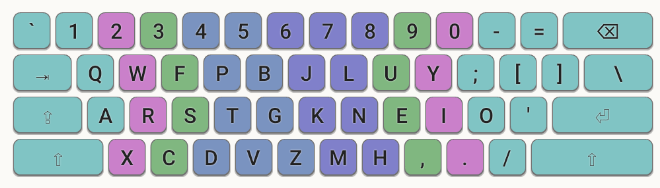
I checked out the DH layout for a couple of days but found that Colemak was actually a little more comfortable in its vanilla state. While lateral movement was an issue at first, I found myself loving the rolling effect of typing so many words once I got faster. I also didn’t like that my shortcut keys for ZXCV were not all together anymore, so I stuck to regular Colemak. I also have no issues admitting that I was already used to Colemak as it was and didn’t want to relearn just a handful of moved keys more.
Speaking of shortcuts, not only were all of my usual shortcuts from ZXCV still available with one hand, but I could still access A, D, F, and now P with one hand! The print shortcut was now possible for me with one hand thanks to Colemak, so it was winning me over with that alone.
Another big advantage of Colemak in general, in my opinion, was the replacement of Caps Lock with a secondary Backspace key. The Caps Lock key is in such a prime position to reach with your left hand, so why put something as useless as Caps Lock there? I couldn’t even remember the last time I purposely wanted to use Caps Lock (I have no issues merely holding the Shift key if I need capital letters), so this seemed like such a logical solution.
However, I decided to be slightly more thorough and investigate the last layout that I had known about.
Workman
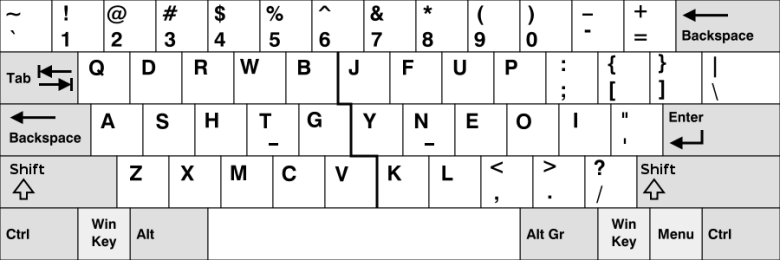
Workman is the last layout on my journey, as well as the last alternative layout I remembered seeing on the options on Keybr.
It looks similar to Colemak at first glance, especially with NEOI instead of NEIO on the right side of the home row. There’s also the fact that the semicolon key gets moved to the same place it is on Colemak. It even (almost) keeps ZXCV by wedging “M” into them. However, I did read up on the reasons the layout exists and it did seem promising at first glance, especially when I read about the same complaint I had about the lateral movements.
What discouraged me was reading up on how people who switched found themselves using it for a while and leaving it behind. I even recalled finding an account of a Workman typist who switched for a long time only to switch again to Colemak-DH in the end. Said account cited the same finger utilization not being so great under Workman. I had also read somewhere (although I was unable to find exactly where I read about it, so take it with a grain of salt; I’ll even update this post if I can confirm this true or false) that the creator of Workman had since then abandoned the layout.
While it did seem like a promising layout, maybe there was something I wasn’t seeing. However, I will admit that the same hand utilization (SHU) for Workman seemed intriguing, although Colemak’s wasn’t too bad for me in the grand scheme of things.
Unfortunately, I never actually tried using this layout. By the time I had considered it, I was already quite happy with Colemak and I suppose I had already been used to the comfortable rolling feeling of typing.
What Did I Stick To?
After giving at least a cursory glance at alternative layouts, I decided I would switch to Colemak and stay on it. Years have passed and I haven’t switched back to QWERTY. I have entertained and tried Colemak-DH on some days, but I have committed in the long run to vanilla Colemak.
What’s It Like Now?
Honestly, on most days, I tend to forget I’m typing on a non-QWERTY layout. It’s already just a part of my life at this point. I usually remember when I have to type on someone else’s computer and I realize that what I naturally touch type comes out as gibberish.
Conversely, I have also had colleagues or friends try to input text on my computer only to become confused. Someone who once hunt and pecked a few keys slowly on my keyboard once even commented on how he thought my computer was broken after he saw what he thought was a jumbled mess.
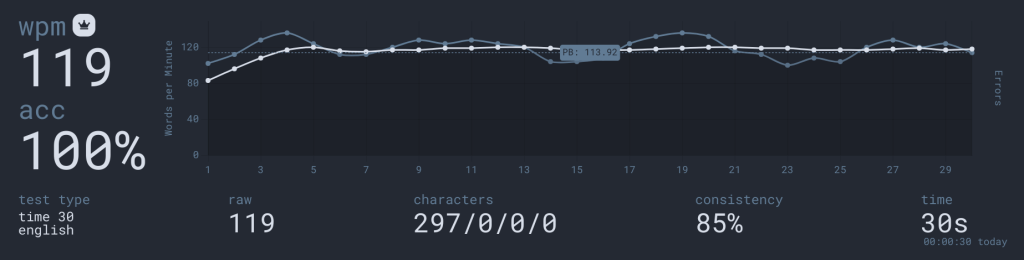
Speed-wise is a different story. While I know many people who have switched from QWERTY discussed that they weren’t touch typists until switching, I was already a touch typist. I saw my speeds go up from just 99 WPM to 119 WPM after switching.
The best part is I no longer struggle with the same carpal tunnel issues I used to have. Of course, that may have something in part to do with how I started kickboxing a few years ago. Whenever I would do arm-strengthening exercises (punching bag practice, weight lifting, push-ups, farmer’s carry, etc.), I noticed my symptoms would either be severely reduced or eliminated altogether. While this is another factory entirely, I don’t think typing on Colemak is all that bad, especially since my fingers move a whole lot less these days compared to QWERTY.
Conclusion
In short, I never see myself going back to QWERTY again for the rest of my life. If anybody out there tends to only use their own computers for work or writing, I would highly recommend exploring alternative keyboard layouts in general. While Colemak suited me best, I know others may prefer Dvorak, Colemak-DH, or Workman. There are also likely other layouts I haven’t even bothered to explore in-depth, such as Maltron and a few other common regional variants of QWERTY (AZERTY and QWERTZ come to mind).
Do you type with QWERTY, or did you switch to another layout? How comfortable do you feel with your typing?
 Sudo Science
3 responses to “Quitting QWERTY: Exploring Alternative Keyboard Layouts”
[…] effort into learning it. Honestly, it feels as if Internet Time suffers from the same issue that alternate keyboard layouts suffer from; the old way of doing things is so entrenched and widespread that trying to change […]
LikeLike
[…] ticket through the tech department. Imagine waiting over a week for someone to show up simply to install the Colemak layout on my device because Windows still doesn’t want to support it […]
LikeLike
[…] chart. That’s when it incorrectly claimed that the home row for Colemak was QWFPGJLUY;. I’ve been typing in Colemak for years, and in reality, these keys are from top row, not home […]
LikeLike